
How Many CCTV Cameras Does Your Office Need?
Learn how many CCTV cameras your office needs based on its size, layout and security requirements. Explore camera placement, coverage areas and tips for choosing the right surveillance system.
By virnobyte team · · 15 min read

How Many CCTV Cameras Does Your Office Need? Complete Office Security Guide (2026)
Installing CCTV cameras in an office is an important step towards protecting employees, visitors, equipment and business assets. But one common question every business owner faces is: how many CCTV cameras does my office actually need?
The answer depends on several factors, including office size, floor layout, number of entrances, corridors, reception areas, server rooms, parking spaces and security requirements. A small office may need only four cameras, while a large corporate office may require 20 or more.
Installing too few cameras can leave important areas unmonitored. Installing too many can increase equipment, cabling, storage and maintenance costs without improving security significantly.
In this guide, we explain how to calculate the right number of CCTV cameras for your office, where to install them, which camera types to choose and how to plan an effective office surveillance system in India.
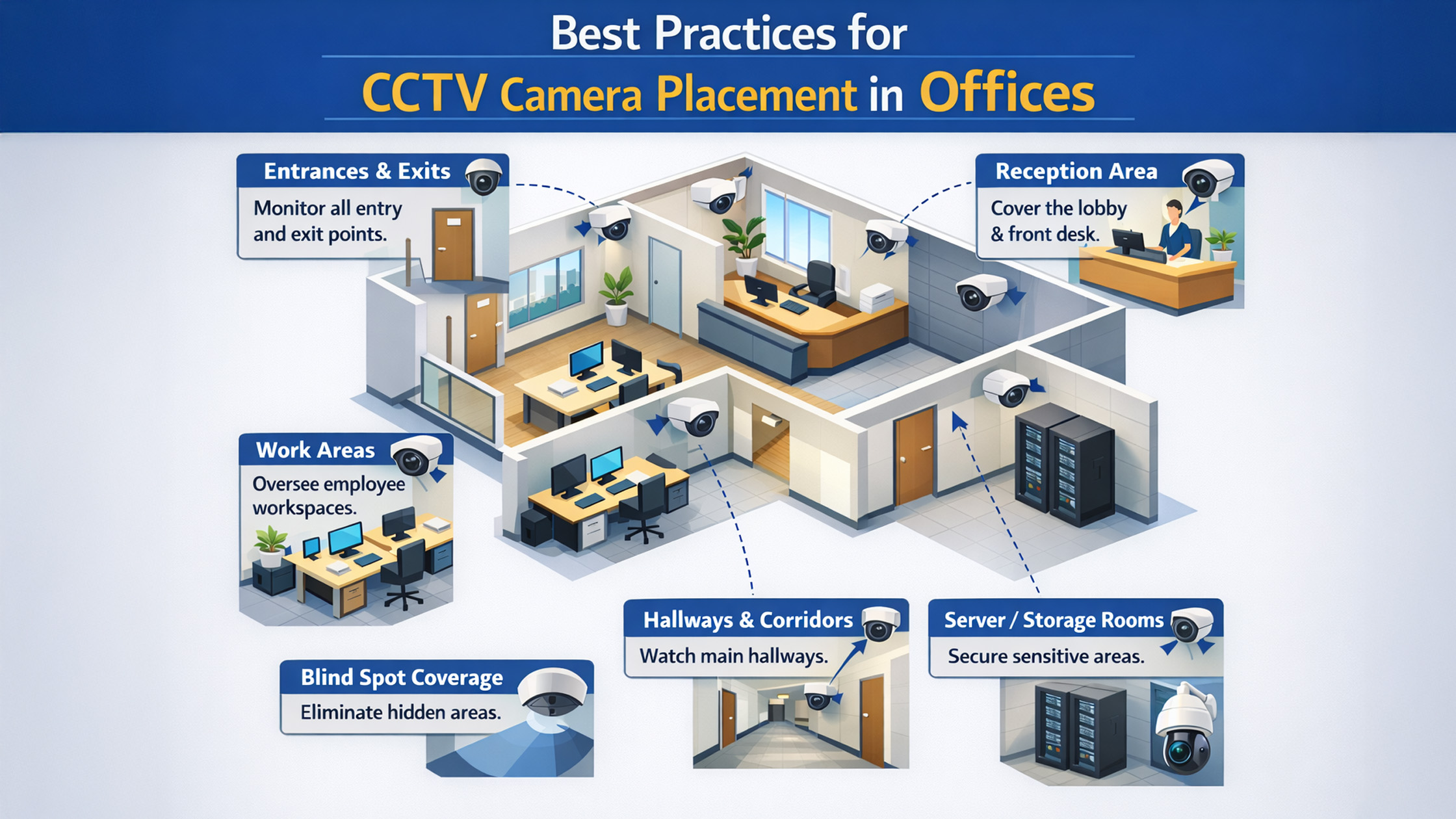
1. How Many CCTV Cameras Does a Typical Office Need?
The number of cameras should be determined by the areas that need monitoring rather than by employee count or floor area alone.
The following table provides general planning estimates for different office sizes.
| Office Type | Approximate Area | Suggested Camera Count | Typical Coverage |
|---|---|---|---|
| Small office | Up to 1,500 sq. ft. | 4–6 cameras | Entrance, reception, workspace, server room and exit |
| Medium office | 1,500–5,000 sq. ft. | 8–12 cameras | Entrances, reception, corridors, work areas and equipment rooms |
| Large office | 5,000–15,000 sq. ft. | 15–25 cameras | Multiple entrances, floors, corridors, parking and restricted areas |
| Multi-floor corporate office | 15,000+ sq. ft. | 25+ cameras | Each floor, lift lobbies, staircases, entrances and common areas |
Important: These figures are initial planning ranges, not a guaranteed camera count. A compact office with several separate entrances may need more cameras than a larger open-plan office. A site survey is the best way to determine the exact requirement.
2. How to Calculate the Number of CCTV Cameras for Your Office
Before purchasing cameras, divide your office into different security zones. Identify the areas where you need general monitoring, visitor identification, asset protection or movement tracking.
Step 1: Count all entrances and exits
Start by identifying every entrance and exit, including the main office door, rear door, emergency exit and access points connected to staircases or parking areas.
Consider a camera angle that captures useful views of people entering and leaving. A camera mounted directly above a doorway may capture only the tops of people's heads. Positioning and lens selection should be planned for the intended identification task.
Step 2: Identify important business areas
List locations that contain valuable equipment, confidential documents, stock, cash or critical IT infrastructure.
Examples include:
- Server and network rooms
- IT equipment storage areas
- Finance and accounts departments
- Document storage rooms
- Inventory and stock rooms
- Reception and visitor management areas
Step 3: Check corridors and common areas
Long corridors, staircase approaches and lift lobbies can create blind spots. Check whether one camera can cover the required view or whether additional cameras are needed at corridor ends and junctions.
Step 4: Check outdoor areas
If your office has a parking area, building entrance, rear gate or loading area, include these locations in the surveillance plan.
Step 5: Draw a camera placement layout
Mark the proposed camera positions on an office floor plan. Check the viewing direction, field of view, lighting, obstructions and overlapping coverage before installation.
3. Where Should CCTV Cameras Be Installed in an Office?
Camera placement is one of the most important parts of an office surveillance system. A well-positioned camera can provide useful footage, while a poorly positioned camera may record an obstructed or unhelpful view.
1. Main entrance and exit
The main entrance is one of the highest-priority locations. Install a camera to monitor visitors, employees and movement through the doorway.
- Monitor people entering and leaving.
- Choose a suitable lens for the doorway distance.
- Avoid strong backlighting that can obscure faces.
- Consider additional coverage if there are separate entry and exit routes.
2. Reception and waiting area
The reception area is where visitors usually arrive and wait. A camera can provide a record of visitor activity and help review incidents.
- Cover the visitor entrance and reception zone.
- Monitor the waiting area where appropriate.
- Avoid unnecessarily recording computer screens or confidential documents.
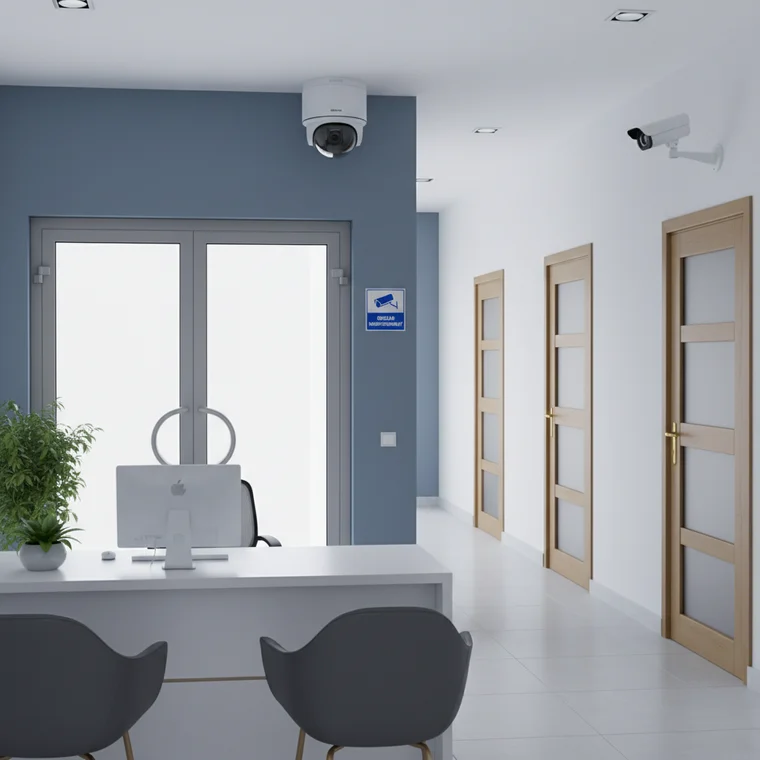
3. Office workspace
An overview camera may be useful in a large shared workspace. The objective should be general security monitoring, not unnecessary observation of individual employees.
Consider the room shape, partitions, furniture and lighting before deciding how many cameras are needed.
4. Server room and network room
Server rooms contain important business infrastructure such as servers, switches, routers, storage devices and networking equipment.
A dedicated camera can monitor access to the room and help investigate unauthorised entry or equipment-related incidents.

5. Corridors and staircases
Corridors connect different departments and rooms. CCTV cameras can help monitor movement between important areas.
- Install cameras at corridor junctions.
- Check long passages for blind spots.
- Consider staircase entrances and landings.
- Make sure doors and other objects do not obstruct the view.
6. Parking area and building entrance
For offices with dedicated parking, consider cameras covering vehicle entry and exit routes, pedestrian access and important parking zones.
Outdoor cameras should be suitable for the weather and lighting conditions. If vehicle number plates need to be captured, a dedicated camera with appropriate lens, angle, shutter settings and lighting may be necessary.
7. Storage and inventory room
If your office stores laptops, desktops, accessories, tools or other valuable items, consider installing a camera to monitor the storage room entrance and relevant handling areas.
4. CCTV Camera Count for Different Office Layouts
Here are some practical examples to help you understand how camera requirements change with the office layout.
Example A: Small office with 5–10 employees
A small office with one entrance, a reception area, a shared workspace and a small equipment room may require approximately four cameras.
| Location | Suggested Cameras |
|---|---|
| Main entrance | 1 |
| Reception | 1 |
| Shared workspace overview | 1 |
| Equipment or server room entrance | 1 |
| Total | 4 |
If the office has a separate rear entrance, additional corridor or parking area, the requirement may increase to five or six cameras.
Example B: Medium office with 15–30 employees
A medium office may contain multiple cabins, a reception area, a meeting room, a server room and separate entry points.
| Location | Suggested Cameras |
|---|---|
| Main entrance | 1 |
| Reception | 1 |
| Open workspace | 2 |
| Corridors and junctions | 2 |
| Server or equipment room entrance | 1 |
| Rear entrance or parking | 1 |
| Meeting area entrance or other priority zone | 1 |
| Total | 9 |
This is an illustrative nine-camera arrangement. Actual coverage may require fewer or more cameras depending on room divisions and viewing angles.
Example C: Large corporate office
A large corporate office may have several floors, multiple departments, visitor areas, server rooms, parking and restricted-access locations.
| Location | Illustrative Cameras |
|---|---|
| Main entrances and exits | 3 |
| Reception and visitor areas | 2 |
| Corridors and lift lobbies | 4 |
| Workspace overview areas | 4 |
| Server and equipment rooms | 2 |
| Parking and outdoor areas | 3 |
| Other priority zones | 2 |
| Total | 20 |
A multi-floor office may need more cameras if it has separate access points, long corridors or multiple parking levels.
5. Which Type of CCTV Camera Is Best for an Office?
Different CCTV camera designs are suitable for different office environments. Selecting the correct type can be just as important as deciding the camera count.
Dome CCTV cameras
Dome cameras are commonly installed indoors on ceilings. They are suitable for reception areas, corridors, meeting-area entrances and general office monitoring.
Bullet CCTV cameras
Bullet cameras are commonly used outdoors and in locations where a more directional view is required. They may be suitable for building entrances, gates and parking areas.
IP CCTV cameras
IP cameras transmit video over a network and are commonly used in modern office surveillance systems. They can support higher resolutions, remote viewing and integration with compatible recording systems.
PTZ cameras
PTZ stands for Pan-Tilt-Zoom. These cameras can move and zoom to observe different parts of a large area. They are useful in selected environments where an operator can control the camera, but they should not automatically replace fixed cameras covering critical entry points.
| Camera Type | Recommended Location | Main Purpose |
|---|---|---|
| Dome | Indoor office areas | General surveillance |
| Bullet | Outdoor entrances and parking | Directional monitoring |
| IP camera | Modern office networks | Network-based surveillance |
| PTZ | Large open areas | Operator-controlled monitoring |
| Varifocal camera | Entrances and specific viewing zones | Adjustable field of view |
6. What CCTV Camera Resolution Should an Office Choose?
Camera resolution affects how much image detail is recorded. The right resolution depends on the distance from the camera to the subject and the purpose of the footage.
| Resolution | Typical Use |
|---|---|
| 2MP / Full HD | Basic monitoring of corridors and general areas |
| 4MP | Reception, entrances and many office applications |
| 5MP | Additional detail for selected business areas |
| 8MP / 4K | High-detail monitoring where equipment and lighting support it |
Higher resolution does not automatically guarantee better identification. Lens quality, camera placement, lighting, frame rate and recording bitrate also matter.
Read our related guide: 2MP vs 5MP vs 8MP CCTV Camera (replace this link with the published article URL).
7. DVR or NVR: Which Recording System Does Your Office Need?
The recording device stores CCTV footage and allows authorised users to view live and recorded video.
DVR (Digital Video Recorder)
A DVR is generally used with compatible analog HD cameras. It receives video through coaxial cabling and records the footage.
NVR (Network Video Recorder)
An NVR records video from compatible IP cameras over a network. Many IP cameras use Power over Ethernet (PoE), which can carry both data and power over a single network cable.
For a new office IP surveillance installation, an NVR-based system is often worth considering. The choice depends on the existing cabling, camera compatibility, budget and system requirements.
Read more: DVR vs NVR: Which Is Better? (replace with the actual published article URL).
8. How Much CCTV Storage Does an Office Need?
Storage capacity depends on the number of cameras, resolution, frame rate, bitrate, recording schedule and the number of days for which footage must be retained.
For example, an office with eight cameras recording continuously will generally require more storage than a system with four cameras recording only when motion is detected.
Important storage planning factors
- Number of installed cameras
- Camera resolution
- Frames per second (FPS)
- Video compression, such as H.264 or H.265
- Continuous or motion-based recording
- Required retention period
Do not select a hard drive based only on camera count. Calculate the storage requirement using the actual recording settings and check the recorder's supported drive capacity.
9. How Much Does Office CCTV Installation Cost in India?
The cost of installing CCTV in an office depends on the camera brand, resolution, recorder, storage, cable length, network equipment, installation complexity and warranty.
There is no single price that applies to every office. A quotation should clearly separate the equipment and installation charges.
What affects the installation cost?
- Number and type of cameras
- 2MP, 4MP, 5MP or 8MP resolution
- DVR or NVR recording system
- Hard disk capacity and recording retention
- PoE switches and network cabling
- Conduit, cable routes and mounting accessories
- Installation, configuration and testing
- Remote viewing setup and maintenance requirements
For a useful estimate, request an itemised quotation after a site survey. This helps compare systems based on equivalent specifications rather than camera count alone.
10. Common Mistakes to Avoid When Installing Office CCTV
- Installing too few cameras: Important entrances or corridors may remain uncovered.
- Ignoring blind spots: Walls, partitions and furniture can block the camera view.
- Using the wrong lens: A very wide lens may show the whole room but provide insufficient detail for identification.
- Ignoring night-time lighting: A camera may perform differently after office hours.
- Choosing an incompatible recorder: Check the camera format, resolution and recorder capacity.
- Not planning storage: The system may overwrite footage earlier than expected.
- Leaving default passwords: Change default credentials and use strong, unique passwords.
- Skipping maintenance: Dirty lenses, failed hard drives and disconnected cameras can create gaps in recordings.
11. Office CCTV Privacy and Security Considerations in India
Office CCTV should be installed for legitimate and clearly defined security purposes. Businesses should consider employee privacy, visitor awareness and secure handling of recorded footage.
- Display appropriate CCTV surveillance notices at relevant entrances.
- Inform employees about the purpose and general coverage of workplace cameras.
- Do not install cameras in washrooms, changing rooms or other private spaces.
- Avoid unnecessary recording of computer screens, confidential documents or personal conversations.
- Restrict live viewing and recorded footage to authorised personnel.
- Use strong passwords, secure remote access and updated device firmware.
- Define how long footage is retained and who is authorised to access or share it.
Businesses should review applicable Indian privacy and data-protection requirements for their particular use of CCTV, including the Digital Personal Data Protection Act and applicable rules. This article is general information, not legal advice.
12. Office CCTV Installation Checklist
Use this checklist before finalising your office CCTV project:
- Identify every entrance and exit.
- Mark reception and visitor areas.
- Identify server rooms and restricted areas.
- Review corridors, staircases and lift lobbies.
- Check parking and outdoor coverage requirements.
- Select suitable camera types and resolutions.
- Confirm DVR/NVR compatibility.
- Calculate storage and retention requirements.
- Check network bandwidth and PoE requirements.
- Plan secure remote viewing and user permissions.
- Review privacy requirements and display notices.
- Test live view, playback, recording and night vision after installation.
13. Why Choose Virnobyte for Office CCTV Installation?
Virnobyte Private Limited provides CCTV surveillance, computer hardware, networking and IT support solutions for offices and businesses.
We help businesses plan surveillance systems according to their premises, security requirements, camera positions, recording needs and budget.
Our CCTV and IT services include:
- Office CCTV camera installation
- Indoor dome and outdoor bullet cameras
- IP camera and analog HD CCTV systems
- DVR and NVR installation
- Network cabling and PoE switch configuration
- Remote viewing setup
- CCTV troubleshooting and maintenance
- Hardware and networking AMC services
Virnobyte has its head office in Pune, Maharashtra, a strong presence in Karnataka and Goa, and serves customers across India. On-site service availability depends on location and project requirements.
Planning CCTV Installation for Your Office?
Not sure whether your office needs 4, 8, 12 or 16 cameras? Virnobyte can help you assess the layout and plan a suitable CCTV system for your business.
VIRNOBYTE PRIVATE LIMITED
Technology • Innovation • Trust
Head Office: Sadichha Complex, Sawtamali Temple Road, Jadhavwadi, Chikhali, Pune – 411062, Maharashtra, India.
Phone: 8669883332
Email: info@virnobyte.com
Website: www.virnobyte.com
Contact Virnobyte to discuss your office CCTV requirements and request a site assessment.
Frequently Asked Questions (FAQs)
1. How many CCTV cameras are required for a small office?
A small office may need approximately 4–6 cameras for its entrance, reception, shared workspace, equipment room and other important areas. The final count depends on the floor plan and security requirements.
2. How many CCTV cameras are required for a 2,000 sq. ft. office?
A 2,000 sq. ft. office may need around 6–10 cameras, depending on its number of entrances, corridors, rooms, reception and restricted areas. A site survey is recommended.
3. Which CCTV camera is best for an office?
Indoor dome cameras are commonly used for reception and corridors, while outdoor bullet cameras are suitable for selected external locations. IP cameras are a popular option for new network-based installations.
4. Should office CCTV cameras record continuously?
Continuous recording is useful where a complete record is required. Motion-based recording may reduce storage consumption, but settings should be tested to ensure important events are not missed.
5. How many days should office CCTV footage be stored?
The required retention period depends on the business's security policy, operational requirements and applicable obligations. Storage capacity should be calculated based on the actual number of cameras and recording settings.
6. Can office CCTV be viewed on a mobile phone?
Yes. Compatible DVR and NVR systems can support authorised remote viewing through mobile applications or approved software. Secure configuration and access permissions are important.
7. Can CCTV cameras monitor employees at their desks?
Camera placement should be proportionate to a legitimate security purpose. Prefer monitoring entrances, shared areas and sensitive equipment zones rather than unnecessarily focusing on individual employees or their screens.
8. Is an NVR better than a DVR for a new office?
An NVR is often suitable for new IP-camera installations, especially where PoE networking is planned. A DVR may be appropriate when using compatible analog cameras or reusing existing coaxial cabling.
9. Does every office need a separate camera for its server room?
A dedicated camera at the server room entrance is often useful where the room contains important business infrastructure. The exact arrangement depends on access controls and security requirements.
10. Can CCTV cameras be installed without disturbing office operations?
Installation can often be scheduled outside working hours or in phases to reduce disruption. The approach depends on cable routes, ceiling access and site conditions.
Useful External Resources and Further Reading
- CCTV for Offices: A Planning Guide – Office coverage zones, camera-count examples and privacy considerations.
- Top 8 Places to Install CCTV Cameras in Office Buildings – Practical examples of office camera locations.
- RCMP CCTV System Design Guide – Technical guidance on CCTV planning, field of view, lighting and equipment selection.
- Guidelines for Implementation of CCTV Cameras in Government Offices – Indian government-office guidance on camera coverage and recording systems.
- Office CCTV Installation in Pune – Examples of office CCTV coverage areas and installation considerations.
Disclaimer: Camera counts in this article are indicative planning estimates. Actual requirements depend on the office floor plan, viewing distance, camera specifications, lighting and security objectives. External images belong to their respective owners. Obtain permission or use appropriately licensed images before commercial publication.