
CCTV Camera Installation Process Explained
Learn the CCTV camera installation process step by step, from site inspection and camera placement to wiring, DVR/NVR setup, mobile monitoring and system testing for homes and businesses.
By virnobyte team · · 18 min read

CCTV Camera Installation Process Explained: Complete Step-by-Step Guide for Homes, Offices and Businesses (2026)
Installing CCTV cameras is one of the most practical ways to improve security at a home, office, shop, warehouse or commercial property. However, buying good cameras is only the beginning. Correct camera placement, professional wiring, recorder configuration, secure network settings and proper testing are all essential for a reliable surveillance system.
Whether you are planning a new CCTV installation or upgrading an existing security system, understanding the installation process can help you make better decisions. In this guide, we explain how CCTV cameras are installed, what equipment is required, how DVR and NVR systems work, how mobile viewing is configured and what you should check before accepting the completed installation.
We also cover common installation mistakes, maintenance tips and important CCTV security considerations for customers in India.
Quick Overview: How Does CCTV Camera Installation Work?
A typical CCTV installation follows these steps:
- Inspect the property and understand security requirements.
- Select suitable cameras and recording equipment.
- Prepare a camera placement and coverage plan.
- Plan the power supply and cable routes.
- Install and mount the cameras.
- Connect cameras to the DVR, NVR or network switch.
- Configure recording and storage settings.
- Set up remote viewing on mobile devices.
- Test all cameras and recording functions.
- Hand over the system and explain maintenance requirements.
1. Site Inspection and Security Assessment
The first and most important step is a site inspection. Before purchasing equipment or drilling holes, the installer should understand the property and identify which areas need surveillance.
Every property has different security requirements. A retail shop may need cameras at its entrance and billing counter, while an office may require monitoring at reception, corridors and permitted common areas.
Areas to inspect before installation
- Main entrance and exit points
- Reception and waiting areas
- Cash counters and billing desks
- Parking areas and vehicle entrances
- Storage rooms and inventory sections
- Corridors, staircases and common areas
- Warehouse loading and unloading zones
- Building perimeter and outdoor access points
The installer should also check ceiling height, lighting conditions, wall material, possible obstructions, available power points, internet connectivity and the distance between cameras and the recording device.
Why is a site survey necessary?
A site survey helps determine the number of cameras, their locations, suitable camera types, cable requirements and recorder capacity. It also helps identify blind spots before installation starts.
2. Select the Right CCTV Camera and Equipment
After the site inspection, the next step is selecting cameras according to the location and monitoring purpose. An indoor camera may not be suitable for an exposed outdoor area. Similarly, a wide-angle camera may not provide enough detail when a particular object or distant entrance needs to be identified.
Common types of CCTV cameras
| Camera Type | Best Suited For | Main Characteristics |
|---|---|---|
| Dome Camera | Offices, shops and reception areas | Compact design and discreet installation |
| Bullet Camera | Outdoor entrances and building perimeters | Directional monitoring and visible deterrence |
| Turret Camera | Indoor and outdoor locations | Flexible aiming and compact housing |
| IP Camera | Offices, warehouses and commercial sites | Network-based video transmission |
| PTZ Camera | Large premises and open areas | Pan, tilt and zoom functions, depending on model |
| Wi-Fi Camera | Small rooms and selected home applications | Wireless network connection |
Important features to consider
- Resolution: Choose a suitable resolution based on the required image detail and viewing distance.
- Night vision: Infrared or low-light technology helps cameras capture images in darker conditions.
- Weather protection: Outdoor cameras should have suitable environmental protection for their installation location.
- Wide Dynamic Range (WDR): Helps manage scenes with both bright and dark areas.
- Motion detection: Can trigger event recording or alerts when movement is detected.
- PoE support: Allows compatible IP cameras to receive power and data through one Ethernet cable.
- Storage compatibility: Confirm that the selected recorder supports the required camera count, resolution and recording features.
3. Plan Camera Placement and Coverage
Camera placement is one of the most important parts of CCTV installation. Even an expensive high-resolution camera may produce poor footage if it is installed at the wrong angle or faces strong light.
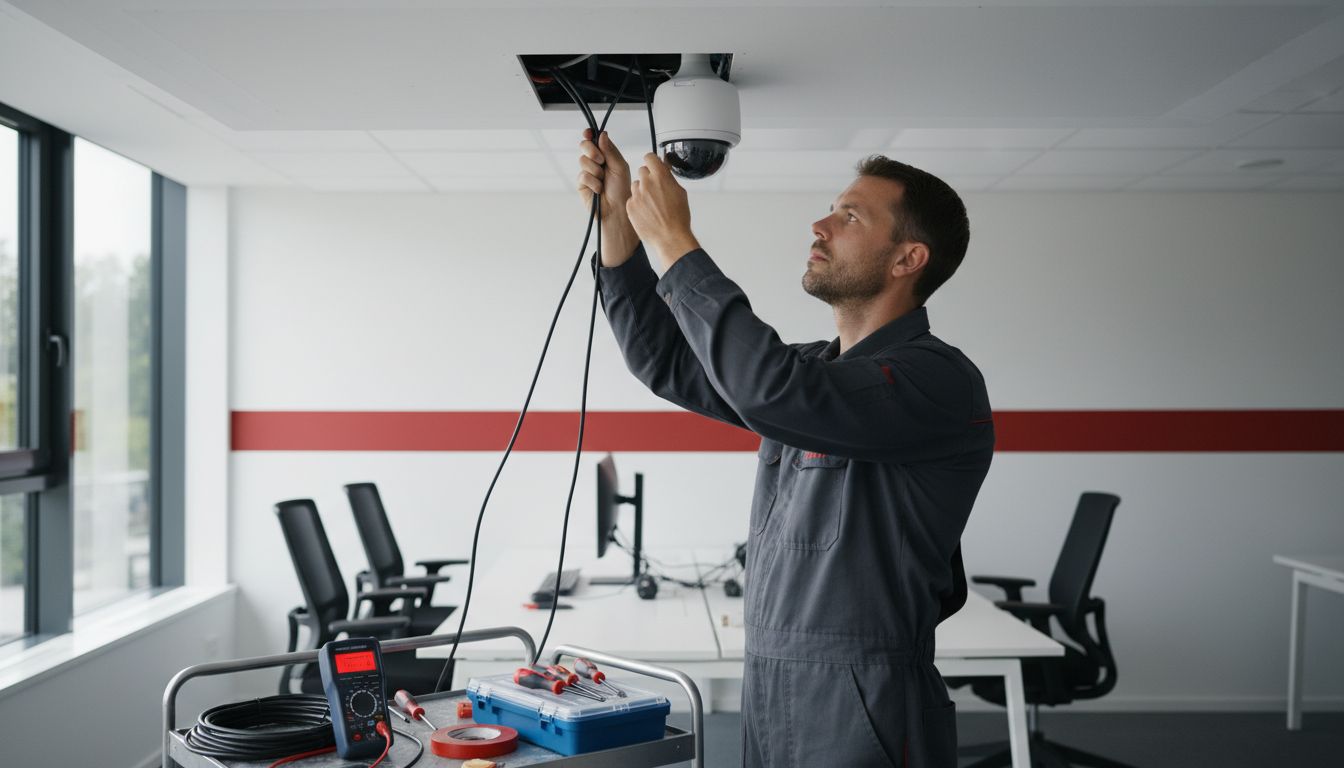
The installer should decide the viewing direction, mounting position and expected coverage area for every camera.
Recommended camera locations
- Install entrance cameras where they can capture people approaching and entering the property.
- Cover billing counters and cash-handling areas where appropriate.
- Monitor parking entrances and vehicle movement if required.
- Cover warehouse aisles, loading bays and dispatch areas.
- Use suitable outdoor cameras for building entrances and perimeter monitoring.
- Check that adjacent cameras do not leave important areas uncovered.
Camera height and angle should be chosen according to the scene, lens and identification requirements. There is no single mounting height suitable for every property.
4. Plan CCTV Wiring, Cabling and Power Supply
Once camera positions are finalized, the installer plans how video, network and power connections will reach each camera. The cabling method depends on whether the system uses analog cameras, IP cameras, PoE or wireless connections.
Common CCTV cable types
| Cable Type | Typical Use |
|---|---|
| Coaxial cable | Traditional analog and HD analog CCTV systems |
| Cat5e Ethernet cable | Network connections for compatible IP cameras |
| Cat6 Ethernet cable | Structured network cabling and suitable IP camera installations |
| Power cable | Separate camera power supplies where required |
How is CCTV cabling installed?
- Measure the cable route from each camera to the recorder or network switch.
- Select cable suitable for the camera system and installation environment.
- Use appropriate conduit or protective casing for exposed cable runs.
- Keep low-voltage surveillance cabling properly separated from electrical wiring as required by applicable standards.
- Protect outdoor cable joints using suitable weather-resistant enclosures.
- Label both ends of the cables for easier maintenance.
- Test cable continuity and connections before completing the installation.
What is PoE in CCTV installation?
PoE stands for Power over Ethernet. It allows a compatible IP camera to receive both electrical power and network data through a single Ethernet cable.
This can reduce the need for separate camera power cables and simplify installations. However, the camera, switch or injector must support compatible PoE standards, and the available power budget and cable distance must be checked.

For additional technical information, read the Cisco IP Camera Installation Guide, which explains network connections, PoE requirements and installation precautions.
5. Mount and Install the CCTV Cameras
After completing the cabling plan, the cameras are mounted at their approved locations. The mounting surface must be strong enough to support the camera and bracket. Outdoor installations need suitable protection against water, dust and environmental exposure.
Typical camera mounting procedure
- Mark the camera position and mounting holes.
- Check for hidden electrical cables or pipes before drilling.
- Drill the required holes and install suitable wall plugs or anchors.
- Secure the mounting bracket.
- Connect the camera's power and video or network cables.
- Attach the camera and adjust its viewing direction.
- Protect exposed connectors and inspect the camera housing.
- Check the live camera feed before finalizing the position.
Outdoor camera installations require additional attention to cable entry points, water ingress, direct sunlight, dust and physical protection.
6. Install the DVR or NVR Recording System
The recorder stores video footage and allows authorized users to view live and recorded video. It should be installed in a secure, ventilated location with suitable power and network connectivity.
What is a DVR?
A Digital Video Recorder (DVR) is commonly used with analog or HD analog CCTV cameras. Cameras typically connect to the recorder using coaxial video cables, with separate power connections often required.
What is an NVR?
A Network Video Recorder (NVR) works with IP cameras. The cameras transmit video over a network connection, and the NVR records the video. Depending on the design, cameras may connect directly to a PoE NVR or through a separate network switch.
DVR vs NVR comparison
| Feature | DVR | NVR |
|---|---|---|
| Common camera type | Analog or HD analog | IP network cameras |
| Connection | Typically coaxial cable | Typically Ethernet network cable |
| Camera power | Often separate power supply | May use PoE or separate power |
| Network features | Depend on recorder model | Depend on recorder and camera model |
| Typical application | Existing analog systems | Network-based surveillance systems |
Steps to install the recorder
- Place the DVR or NVR in a secure and ventilated location.
- Install a compatible surveillance-rated hard drive if required.
- Connect the camera cables or network connections.
- Connect a monitor for initial configuration.
- Connect the recorder to a suitable power supply or UPS.
- Connect the recorder to the network router or switch if remote viewing is required.
- Check that all cameras are detected and displaying correctly.
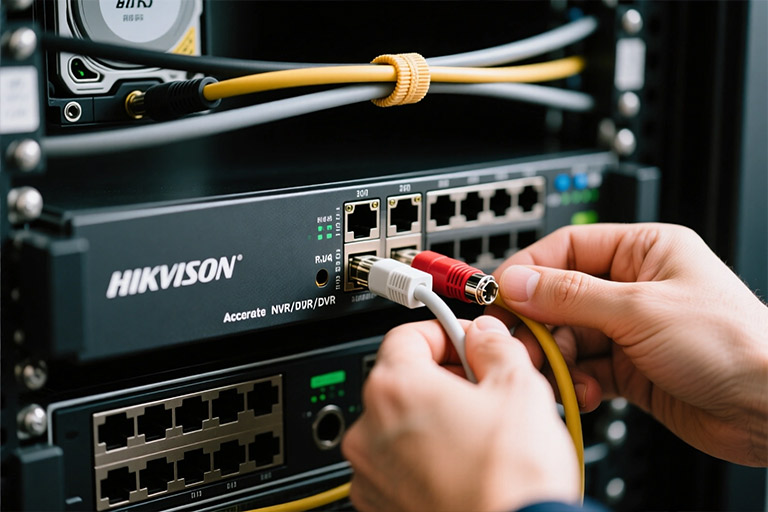
Always follow the recorder manufacturer's instructions. Before formatting or initializing a hard drive, make sure it does not contain footage or other data that must be retained.
7. Configure Recording and Storage Settings
Connecting cameras to the recorder is not enough. Recording settings must be configured so that the system saves footage according to the customer's requirements.
Common recording modes
- Continuous recording: Records video continuously.
- Motion-based recording: Records when configured motion events occur.
- Scheduled recording: Records during selected days or time periods.
- Event-based recording: Records based on supported events such as intrusion detection or line crossing.
How much storage is required?
Storage requirements depend on several factors:
- Number of cameras
- Camera resolution
- Frame rate
- Video compression technology
- Continuous or motion-based recording
- Number of days footage needs to be retained
Ask the installer to estimate storage using the actual camera and recorder settings. Do not select a hard drive based only on the number of cameras.
8. Configure Mobile Viewing and Remote Monitoring
Many modern CCTV systems support live viewing and playback through a smartphone, tablet or computer. This feature is useful for business owners who need to monitor their premises while away.
Mobile CCTV setup process
- Connect the recorder or supported camera to the network.
- Install the manufacturer's official mobile application.
- Add the recorder or camera using the supported setup method.
- Configure access for authorized users.
- Test live viewing and playback over Wi-Fi and mobile data.
- Configure notifications if required and supported by the equipment.
How to secure remote CCTV access
- Change default passwords immediately.
- Use strong and unique passwords.
- Restrict access to authorized users.
- Keep device firmware and applications updated.
- Use the manufacturer's supported secure remote-access method or a properly configured VPN.
- Avoid exposing recorder services directly to the internet through insecure port forwarding.
- Remove access for employees or users who no longer require it.
9. Test the Complete CCTV System
Testing is essential before the installer hands over the system. Each camera should be checked in actual operating conditions, including at night if night surveillance is required.
CCTV installation testing checklist
- All cameras are powered on and visible in the recorder.
- Camera angles cover the intended areas.
- Daytime video is clear and properly exposed.
- Night vision or low-light performance has been checked.
- Recording is working and saved footage can be played back.
- Motion detection and alerts work where configured.
- Hard-drive status and storage settings are checked.
- Remote viewing works on authorized devices.
- Time, date and time zone are correct.
- UPS backup and power recovery are checked where provided.
- Administrator access and customer credentials are handed over securely.
A live picture does not automatically mean the recording system is working correctly. Always check playback to confirm that footage is actually being saved.
10. Customer Handover and CCTV Maintenance
After successful testing, the installer should explain how to operate the CCTV system. The customer should know how to view live footage, search recordings, export video clips and report a fault.
What should be included in the handover?
- Camera location list and channel names
- Recorder and camera model details
- Warranty and support information
- Secure administrator access and user setup guidance
- Recording and storage configuration details
- Instructions for exporting important footage
- Recommended maintenance schedule
Regular CCTV maintenance tasks
- Clean camera lenses and external housings.
- Inspect cable joints and connectors.
- Check that every camera is online.
- Review hard-drive health and recording status.
- Test playback and remote viewing.
- Check UPS and backup power operation.
- Install security updates when recommended by the manufacturer.
Regular maintenance helps identify problems before they affect important recordings.
11. CCTV Installation Requirements for Different Businesses
The installation design should match the property type and security objectives. The following examples show common areas to consider.
| Property Type | Areas to Monitor | Installation Priorities |
|---|---|---|
| Home | Main gate, entrance, parking and permitted outdoor areas | Easy viewing, privacy and secure remote access |
| Retail Shop | Entrance, billing counter, shelves and stock room | Clear coverage of customer and transaction areas |
| Office | Entry points, reception, corridors and common areas | Access monitoring and employee privacy |
| Warehouse | Loading bays, storage aisles, gates and dispatch areas | Wide-area coverage and reliable cabling |
| Factory | Perimeter, entry gates and permitted production access areas | Suitable equipment for industrial conditions |
12. Common CCTV Installation Mistakes to Avoid
Even a good CCTV system can deliver poor results if the installation is not planned properly. Here are some common mistakes to avoid.
- Incorrect camera placement: Important entrances or activity areas may remain outside the camera's view.
- Ignoring lighting conditions: Strong backlighting or poor night illumination can reduce image quality.
- Unprotected outdoor cables: Exposed connections can be damaged by weather or physical interference.
- Insufficient storage: The system may retain fewer days of footage than expected.
- Weak passwords: Default or shared credentials can increase the risk of unauthorized access.
- No backup power: Power interruptions may stop recording or network access.
- Skipping playback tests: A live picture does not prove that footage is being recorded correctly.
- No maintenance plan: Dirty lenses, failed hard drives and loose connections may go unnoticed.
13. CCTV Security and Compliance Requirements in India
CCTV systems collect video information and should be installed and operated responsibly. Cameras should be aimed at legitimate security areas, and access to live and recorded footage should be restricted to authorized people.
Avoid placing cameras in private spaces such as toilets or changing rooms. Where applicable, provide clear notice that surveillance is in operation and follow relevant legal requirements.
Important 2026 CCTV security update
India has introduced security-related Essential Requirements for CCTV cameras. In a Ministry of Electronics and Information Technology (MeitY) office memorandum dated 16 January 2026, the government stated that the relaxation for sale of older CCTV stock that did not meet the notified requirements would be withdrawn from 1 April 2026.
In a government update dated 25 March 2026, the Press Information Bureau also highlighted requirements concerning component-origin documentation, testing for vulnerabilities that could allow unauthorized remote access and testing at accredited laboratories.
Before purchasing CCTV cameras in India, especially for commercial or government-related projects, ask the supplier for the exact model's applicable compliance documentation. Do not assume that every model from a particular brand has the same certification status.
Useful official resources:
- MeitY Office Memorandum – CCTV Essential Requirements, 16 January 2026
- Press Information Bureau – CCTV security requirements update, 25 March 2026
- STQC – IoT System Certification Scheme
- STQC – Certified CCTV product list
14. How Long Does CCTV Camera Installation Take?
Installation time depends on the number of cameras, property size, cable routes, mounting surfaces, network configuration and site access.
| Installation Type | Approximate Planning Estimate |
|---|---|
| 1–2 cameras in a small home | Several hours |
| 4–8 cameras in a shop or small office | About one working day |
| 8–16 cameras in a larger office or warehouse | One to several days |
| Large industrial or multi-building project | Depends on the site survey and project scope |
These are broad planning estimates, not guaranteed completion times. A site survey is needed to confirm the installation schedule.
15. How to Choose a Professional CCTV Installation Company
Selecting the right installer is as important as choosing the camera brand. Before confirming an installation, consider the following points:
- Ask for a site inspection and camera placement plan.
- Request a written quotation with camera models and specifications.
- Confirm the type and quality of cables, connectors and accessories.
- Check DVR/NVR compatibility and recording storage requirements.
- Ask whether mobile viewing and secure access will be configured.
- Confirm warranty terms and after-sales support.
- Ask whether maintenance or an Annual Maintenance Contract (AMC) is available.
- Verify applicable product compliance documents for the exact model.
16. Why Choose Virnobyte for CCTV Installation?
Virnobyte Private Limited provides technology and IT infrastructure solutions for homes, offices and businesses. Our services include CCTV installation and surveillance, networking, computer hardware support and IT maintenance.
We focus on understanding site requirements, selecting suitable equipment, planning camera coverage and configuring the system for practical day-to-day use.
Our CCTV and IT services include:
- CCTV camera installation and setup
- Indoor and outdoor surveillance solutions
- DVR and NVR configuration
- IP camera and network setup
- Remote viewing configuration
- Networking and structured cabling solutions
- IT hardware support and maintenance
- AMC and business IT support
Virnobyte has its head office in Pune, Maharashtra, a strong presence in Karnataka and Goa, and serves customers across India. On-site service availability depends on the location and project requirements.
Looking for Professional CCTV Camera Installation?
Improve your property security with a CCTV solution planned around your requirements.
VIRNOBYTE PRIVATE LIMITED
Technology • Innovation • Trust
Head Office: Sadichha Complex, Sawtamali Temple Road, Jadhavwadi, Chikhali, Pune – 411062, Maharashtra, India.
Phone: 8669883332
Email: info@virnobyte.com
Website: www.virnobyte.com
Service coverage: Pune, Maharashtra | Karnataka | Goa | Pan India
Contact Virnobyte to discuss your CCTV installation requirements and request a site assessment.
Frequently Asked Questions About CCTV Installation
1. What are the steps involved in CCTV camera installation?
The main steps include site inspection, camera selection, placement planning, cable routing, camera mounting, DVR/NVR setup, recording configuration, mobile viewing setup and final system testing.
2. Do CCTV cameras need internet to record?
Most DVR and NVR systems can record locally without an internet connection, provided they have power and suitable storage. Internet is generally required for remote viewing and certain connected features.
3. What is the difference between DVR and NVR?
A DVR is commonly used with analog or HD analog cameras, while an NVR is used with IP network cameras. Their connection methods and supported features depend on the equipment model.
4. Can I view CCTV cameras on my mobile phone?
Yes. Many modern CCTV systems support mobile applications for live viewing and playback. The camera or recorder must support remote access and be configured securely.
5. How many days of footage can a CCTV system store?
Retention depends on hard-drive capacity, camera count, resolution, frame rate, compression and recording mode. Ask the installer to calculate the expected retention period for your configuration.
6. Can CCTV cameras work during a power cut?
They can continue working only if the cameras and required equipment receive backup power. A properly sized UPS or another suitable backup arrangement can help maintain operation during an outage.
7. How often should CCTV cameras be maintained?
Check the system periodically. Clean lenses, inspect connections, verify recording and playback, review hard-drive health and check UPS operation. Maintenance frequency depends on the environment and equipment.
8. Is professional CCTV installation better than DIY installation?
Professional installation can help with camera positioning, protected cabling, recorder configuration, network security and testing. DIY may suit simple camera setups, but larger wired systems often require technical skills and suitable tools.
Helpful External Guides and Technical Resources
For additional information about CCTV installation, camera connections and security requirements, refer to these resources:
- CCTV Installation Technician Handbook – Electronics Sector Skills Council of India. Covers site analysis, camera installation, cabling, recorder connections and system testing.
- Cisco IP Camera Installation Guide. Explains network connections, PoE and installation precautions.
- MeitY CCTV Essential Requirements Memorandum. Official Indian government document about CCTV security requirements.
- PIB CCTV Security Update – March 2026. Government update about CCTV cybersecurity and testing requirements.
- STQC IoT System Certification Scheme. Official information about the certification framework.
Disclaimer: This article is for general educational purposes. Actual installation methods, electrical work, product compatibility, privacy obligations and compliance requirements should be confirmed for the specific site and equipment. Follow manufacturer instructions and use qualified professionals for electrical and elevated installation work. External photographs are included as illustrative references; confirm the copyright and reuse permissions with the respective owners before publishing them on a commercial website.