
CCTV Hard Disk vs Normal Hard Disk
Compare CCTV hard disks and normal hard disks based on durability, recording performance, workload, lifespan and reliability. Discover which HDD is best for DVR and NVR surveillance systems.
By virnobyte team · · 18 min read

CCTV Hard Disk vs Normal Hard Disk: Which Is Better for DVR and NVR? (2026)
Choosing the correct hard disk is essential when installing a CCTV surveillance system. Although a CCTV hard disk and a normal desktop hard disk may have the same physical appearance and SATA connection, they are designed for different types of workloads.
A normal desktop hard disk is commonly used to store operating systems, documents, photographs, videos and other computer files. A CCTV surveillance hard disk is designed to handle continuous video recording, often from multiple cameras running simultaneously.
For homes, shops, offices, warehouses and businesses that use 24/7 CCTV recording, a surveillance-grade hard disk is generally the recommended option.
In this guide, we compare CCTV hard disks and normal hard disks based on recording performance, durability, workload rating, reliability, operating conditions, lifespan and cost. We also explain whether you can use a normal HDD in a DVR or NVR and how to choose the right drive.

1. What Is a CCTV Hard Disk?
A CCTV hard disk is a storage drive designed specifically for video surveillance systems. It is commonly installed inside a Digital Video Recorder (DVR) or Network Video Recorder (NVR) to save footage from connected security cameras.
Unlike a typical desktop computer, which performs a mixture of reading and writing operations, a surveillance recorder may continuously write video data from several cameras at the same time.
Surveillance HDDs are designed to handle this type of workload. Their firmware and hardware features are optimised for continuous video streams and the operating conditions of compatible DVR and NVR systems.
Popular CCTV hard disk examples
- WD Purple: Western Digital's dedicated surveillance hard drive family.
- Seagate SkyHawk: Seagate's dedicated video surveillance hard drive family.
Both product families are designed for surveillance recording applications. Their exact capacities, supported camera counts, workload ratings and features vary by model.
2. What Is a Normal Desktop Hard Disk?
A normal desktop hard disk is designed primarily for personal computers and everyday computing applications. It stores operating systems, software, office documents, photographs, games and other files.
Desktop HDDs are commonly used in desktop computers and compatible external storage devices. They are designed around the workload and operating patterns expected in those environments.
Common desktop hard disk examples
- WD Blue: Western Digital's desktop storage product family.
- Seagate BarraCuda: Seagate's desktop and everyday computing storage product family.
Desktop drives can offer good performance for their intended applications. However, their operating specifications may not be suitable for continuous, multi-camera surveillance recording.
For example, Seagate publishes a 55TB/year workload limit and 2,400 power-on hours per year for a representative desktop HDD specification. These figures are model-specific and should not be assumed for every desktop drive.
3. CCTV Hard Disk vs Normal Hard Disk: Main Differences
The biggest difference is the workload each drive is designed to handle. The following table summarises their typical characteristics.
| Feature | CCTV Surveillance HDD | Normal Desktop HDD |
|---|---|---|
| Primary purpose | Video surveillance recording | Everyday computer storage |
| Operating pattern | Designed for continuous 24/7 surveillance workloads | Designed for typical desktop usage patterns |
| Recording workload | Optimised for multiple video streams | Designed for general read/write activity |
| Firmware | Surveillance-specific recording optimisations on supported models | Optimised for desktop storage tasks |
| Workload rating | Many mainstream models are rated up to 180TB/year | Varies by model; some desktop specifications are around 55TB/year |
| Video frame handling | Specific features may help reduce dropped frames | Not normally optimised for surveillance streams |
| Multiple camera streams | Designed to manage simultaneous camera recording | Not specifically designed for this workload |
| Vibration management | Selected models include vibration-management features | Depends on the drive model |
| DVR/NVR use | Recommended for compatible surveillance systems | May work in some compatible systems but is not the preferred choice |
| Typical application | CCTV DVRs, NVRs and surveillance systems | Desktop computers and everyday storage |
Note: These are general product-category differences. Always check the datasheet for the exact HDD model because specifications vary between capacities and product generations.
4. Recording Performance: Why CCTV Hard Disks Are Different
A surveillance recorder may receive video from four, eight, sixteen or more cameras simultaneously. The hard disk must continuously save these video streams without creating unnecessary interruptions.
For example, a 16-camera installation may generate multiple write operations at the same time. The drive must handle the combined recording workload reliably.
Surveillance HDD recording technology
Dedicated surveillance drives may include firmware optimisations designed to handle continuous video recording.
- WD AllFrame: Western Digital's technology designed to optimise write-intensive surveillance workloads and help reduce video frame loss.
- Seagate ImagePerfect: Seagate's surveillance firmware technology designed to support continuous video streams and reduce dropped frames.
These features are designed to improve surveillance recording reliability. Actual performance still depends on the camera count, video bitrate, recorder compatibility and system configuration.
Read the manufacturers' official product information:
5. Workload Rating: 180TB/Year vs 55TB/Year
Workload rating is an important specification when comparing surveillance and desktop hard disks.
It represents the drive manufacturer's rated annual data workload under specified operating conditions. It is not the same as storage capacity. A 4TB hard disk does not necessarily have a 4TB workload rating.
Example of manufacturer-published specifications
| Drive Example | Published Workload Rating | Important Detail |
|---|---|---|
| WD Purple mainstream surveillance models | Up to 180TB/year | Designed for mainstream DVR and NVR workloads |
| Seagate SkyHawk mainstream surveillance models | Up to 180TB/year | Designed for continuous surveillance recording |
| Representative Seagate desktop HDD specification | Less than 55TB/year | Desktop-use specification, model-dependent |
For the specific examples above, surveillance models are rated for a substantially higher annual workload than the cited desktop HDD specification.
This does not mean every surveillance drive has an identical rating or that every desktop hard disk has a 55TB/year limit. Check the datasheet for the exact product before making a comparison.
6. Durability and 24/7 Operation
Most modern CCTV installations are expected to operate throughout the day and night. Cameras continue recording even when the home or business is closed.
This creates different operating demands from an everyday desktop computer, which may be switched off or used intermittently.
Why surveillance drives are suitable for continuous recording
- Designed for surveillance recording workloads.
- Engineered to handle continuous operation under specified conditions.
- Firmware designed for simultaneous video recording streams.
- Selected models include rotational vibration sensors.
- Specific surveillance features help manage the recording workload.
For example, Seagate describes SkyHawk as a drive family designed for 24/7 surveillance recording. WD similarly describes WD Purple as engineered for mainstream DVR and NVR systems that operate continuously.
Explore the official product information:
7. Lifespan: Does a CCTV Hard Disk Last Longer?
A common question is whether a CCTV hard disk lasts longer than a normal desktop hard disk.
There is no guaranteed lifespan for either type of HDD. Drive life depends on operating hours, temperature, vibration, workload, power quality, installation conditions and individual hardware reliability.
However, surveillance HDDs are designed for the continuous recording workload expected in DVR and NVR environments. This makes them a more suitable choice for those systems.
What affects hard disk lifespan?
- Operating hours: Continuous operation places different demands on a drive than intermittent desktop use.
- Temperature: Poor ventilation and excessive heat can affect drive reliability.
- Vibration: Multiple drives operating in the same enclosure may experience vibration.
- Workload: Recording more data than the drive's rated workload may affect reliability.
- Power supply: Unstable power and sudden shutdowns can create operational risks.
- Environment: Dust, moisture and unsuitable installation conditions may cause problems.
- Drive condition: Manufacturing variation and normal wear can affect the life of an individual drive.
8. Reliability: Which HDD Is Better for CCTV Recording?
Reliability is particularly important in surveillance systems because missing footage can affect incident investigation and security monitoring.
A surveillance-grade HDD is designed to handle the type of continuous video workload commonly generated by DVRs and NVRs.
Many mainstream surveillance models also include firmware or hardware features intended to support multi-camera recording.
What reliability features should you check?
- Annual workload rating
- Surveillance workload compatibility
- Supported number of camera streams
- Operating temperature range
- Vibration-management support
- Manufacturer's warranty for the exact model
- Compatibility with the DVR or NVR
Remember that even a surveillance HDD can fail. For important security systems, monitor drive health, check recording playback regularly and preserve essential footage separately.
9. Can You Use a Normal Hard Disk in a CCTV DVR or NVR?
Yes, a normal desktop HDD may work in some DVR or NVR systems if the recorder supports that drive's interface, capacity and recording configuration.
However, just because a drive is detected does not mean it is the best choice for continuous surveillance recording.
Possible disadvantages of using a desktop HDD
- Its rated annual workload may be lower than that of a surveillance HDD.
- It may not include firmware optimisations for multiple video streams.
- It may not be designed for continuous surveillance operating conditions.
- It may be less suitable for multi-drive recorder environments.
- Its warranty and operating specifications may assume a different usage pattern.
For a simple low-activity system, a compatible desktop drive might operate successfully. For a business, shop, office or home that needs continuous recording, a surveillance-rated drive is generally the safer selection.
10. WD Purple vs Seagate SkyHawk: Which Surveillance HDD Is Better?
WD Purple and Seagate SkyHawk are two popular surveillance hard disk product families. Both are designed for continuous video recording, although their specific features differ by model.
| Feature | WD Purple | Seagate SkyHawk |
|---|---|---|
| Manufacturer | Western Digital | Seagate |
| Purpose | Video surveillance recording | Video surveillance recording |
| Surveillance firmware | AllFrame technology | ImagePerfect technology |
| Workload rating | Up to 180TB/year on supported mainstream models | Up to 180TB/year on supported mainstream models |
| Camera stream support | Up to 64 single-stream HD cameras on supported capacities | Supports up to 64 HD camera streams on supported models |
| Typical application | DVR and NVR surveillance systems | DVR and NVR surveillance systems |
Both are suitable product families to consider for compatible surveillance installations. There is no single winner for every DVR or NVR.
When should you choose WD Purple?
- Your recorder is listed as compatible with the selected WD Purple model.
- You need a dedicated surveillance HDD for continuous video recording.
- You want a drive with WD's surveillance-specific AllFrame technology.
When should you choose Seagate SkyHawk?
- Your recorder is compatible with the selected SkyHawk model.
- You need a dedicated surveillance drive for continuous video recording.
- You want a drive with Seagate's ImagePerfect surveillance firmware.
Always compare the exact capacity, model number, supported recorder, workload rating, warranty and current price rather than choosing only by brand.
11. Which Hard Disk Should You Choose for Different CCTV Installations?
| Installation Type | Suggested HDD Type | Reason |
|---|---|---|
| Small home CCTV system | Surveillance-grade HDD | Suitable for scheduled or continuous recording |
| Retail shop | Surveillance-grade HDD | Supports continuous monitoring of entrances and counters |
| Small office | Surveillance-grade HDD | Designed for multiple camera recording streams |
| Warehouse | Surveillance-grade HDD | Suitable for demanding, continuous surveillance workloads |
| Factory or manufacturing unit | Surveillance or enterprise surveillance HDD, as required | Drive capacity and workload should match the system design |
| Desktop computer | Compatible desktop HDD | Designed for everyday computer storage tasks |
12. What Capacity Should You Buy for CCTV?
After selecting the correct type of hard disk, calculate the capacity required for your cameras.
Common surveillance HDD capacities include:
- 1TB
- 2TB
- 4TB
- 6TB
- 8TB
- 10TB and higher, depending on the product and recorder
The required capacity depends on the camera count, resolution, bitrate, FPS, compression and number of recording days.
For example, a four-camera system recording continuously at an average bitrate of 2 Mbps per camera uses approximately 2.59TB of raw video storage over 30 days, before adding planning headroom.
Use these official tools to estimate the storage requirement:
13. How to Install a CCTV Surveillance Hard Disk
Installing a new hard disk in a DVR or NVR should be done carefully. The exact process depends on the recorder design.
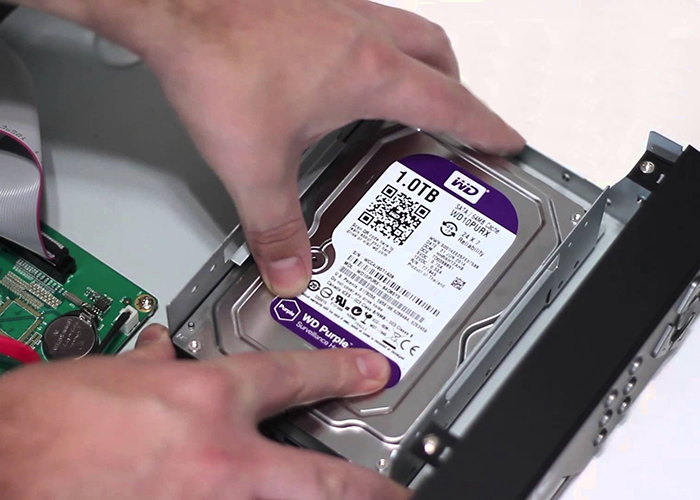
General HDD installation steps
- Switch off the DVR or NVR and disconnect its power supply.
- Open the recorder's enclosure according to the manufacturer's instructions.
- Locate the HDD mounting area.
- Install the compatible surveillance hard disk securely.
- Connect the SATA data cable and power cable.
- Close the recorder enclosure.
- Reconnect power and start the device.
- Open the recorder's storage or HDD management menu.
- Check that the drive is detected and reports a normal status.
- Initialise or format the drive only when appropriate and after confirming that no important data needs to be preserved.
- Configure the recording schedule and test playback.
14. Common Hard Disk Problems in CCTV Systems
Even surveillance-grade hard disks need monitoring and maintenance. The following problems may affect CCTV recording.
| Problem | Possible Cause | Suggested Solution |
|---|---|---|
| HDD not detected | Loose cable, power problem or incompatible drive | Check connections and recorder compatibility. |
| Recording stops | Storage full, disk error or recording settings | Check HDD status and recording configuration. |
| Playback is unavailable | Recording failure or storage problem | Inspect disk health and recorder logs. |
| Unusual clicking noise | Possible mechanical drive fault | Stop unnecessary use and seek professional assessment. |
| HDD warning appears | Disk health or write/read error | Check the recorder's HDD diagnostics. |
| Old recordings disappear | Overwrite setting or retention limit | Review overwrite and storage capacity settings. |
15. How to Maintain a CCTV Hard Disk
Regular maintenance helps identify storage problems before they result in missing footage.
- Check HDD health status regularly through the recorder.
- Review recording playback to confirm that video is being saved correctly.
- Keep the DVR or NVR in a ventilated location.
- Protect the recorder from dust, moisture and excessive heat.
- Use an appropriate power supply and UPS where required.
- Check storage capacity and overwrite settings.
- Monitor drive alerts and recorder logs.
- Export important footage to separate secure storage.
- Replace a failing drive promptly after preserving any recoverable footage.
16. Final Verdict: CCTV Hard Disk vs Normal Hard Disk
A normal desktop HDD is designed for everyday computer storage, while a CCTV surveillance HDD is engineered for the continuous recording workloads commonly found in DVR and NVR installations.
Although a normal hard disk may work in some compatible recorders, it may not offer the same workload rating or surveillance-specific firmware features as a dedicated surveillance model.
17. Why Choose Virnobyte for CCTV Storage and Installation?
Virnobyte Private Limited provides CCTV surveillance, computer hardware, networking and IT support solutions for homes, shops, offices and businesses.
We help customers select suitable surveillance hard drives, configure DVR/NVR storage and plan recording capacity based on camera count, resolution, bitrate and retention requirements.
Our CCTV and IT services include:
- CCTV camera installation and configuration
- DVR and NVR installation
- WD Purple and Seagate SkyHawk HDD selection
- CCTV hard disk replacement
- HDD storage planning and configuration
- CCTV recording troubleshooting
- IP camera and networking solutions
- CCTV maintenance and IT AMC services
Virnobyte has its head office in Pune, Maharashtra, a strong presence in Karnataka and Goa, and serves customers across India. On-site service availability depends on location and project requirements.
Need the Right Hard Disk for Your CCTV System?
Not sure whether your DVR or NVR needs a normal HDD or a surveillance-grade hard disk? Virnobyte can help you assess recorder compatibility, camera count, storage capacity and recording requirements.
VIRNOBYTE PRIVATE LIMITED
Technology • Innovation • Trust
Head Office: Sadichha Complex, Sawtamali Temple Road, Jadhavwadi, Chikhali, Pune – 411062, Maharashtra, India.
Phone: 8669883332
Email: info@virnobyte.com
Website: www.virnobyte.com
Contact Virnobyte for CCTV hard disk selection, installation and technical support.
Frequently Asked Questions (FAQs)
1. What is the difference between a CCTV hard disk and a normal hard disk?
A CCTV hard disk is designed for continuous surveillance recording and multiple video streams. A normal desktop hard disk is designed primarily for everyday computer storage tasks.
2. Can I use a normal hard disk in a CCTV DVR?
Some DVRs may support compatible desktop hard disks. However, for continuous 24/7 recording, a surveillance-grade HDD is generally the more suitable option.
3. Is WD Purple better than a normal WD Blue hard disk for CCTV?
WD Purple is specifically designed for surveillance recording, while WD Blue is a desktop storage product family. For a compatible DVR or NVR recording continuously, WD Purple is the more appropriate product category.
4. Is Seagate SkyHawk better than Seagate BarraCuda for CCTV?
SkyHawk is Seagate's dedicated surveillance drive family, while BarraCuda is designed for desktop storage applications. For continuous multi-camera recording, SkyHawk is generally the more suitable choice.
5. Can I use an SSD instead of an HDD in a CCTV DVR?
Only if the recorder explicitly supports the SSD's interface and storage type. An SSD may offer different performance characteristics, but it should not automatically be treated as a direct replacement for a surveillance HDD. Check recorder compatibility and the manufacturer's recommended storage devices.
6. How long does a CCTV surveillance hard disk last?
There is no guaranteed lifespan. Operating hours, temperature, workload, vibration, power conditions and individual drive reliability all affect service life. Monitor the drive's health and replace it when warning signs appear.
7. What does 180TB per year mean on a surveillance HDD?
It is the manufacturer's annual workload rating for the supported drive model. It describes the rated amount of data handling under specified conditions, not the disk's storage capacity or guaranteed lifespan.
8. Does a CCTV hard disk record continuously?
It is designed to support continuous surveillance recording, but whether the system records continuously depends on the DVR/NVR settings and recording schedule.
9. Can a normal desktop HDD cause CCTV recording problems?
It may work in a compatible system, but a desktop drive may be less suitable for continuous multi-camera recording. Problems can depend on workload, drive condition and recorder compatibility.
10. Which hard disk is best for an office CCTV system?
A compatible surveillance-grade HDD such as WD Purple or Seagate SkyHawk is generally recommended. Choose the capacity according to the number of cameras, recording bitrate and required retention period.
11. Is a bigger CCTV hard disk always better?
Not necessarily. The storage capacity should match the required number of recording days, and the DVR/NVR must support the selected drive capacity. Excess storage may increase cost without providing useful additional retention.
12. Can a CCTV hard disk be used in a computer?
It may be technically possible if the connection and format are compatible, but surveillance drives are optimised for recording workloads rather than typical desktop applications. Select a drive designed for the intended use.
Helpful External Resources and Manufacturer Guides
For more detailed specifications and product information, refer to these manufacturer resources:
- Western Digital – WD Purple Surveillance HDD: Product specifications, AllFrame technology, supported camera streams and workload information.
- Seagate – SkyHawk Surveillance HDD: Information about 24/7 operation, ImagePerfect firmware, camera streams and annual workload ratings.
- Western Digital – Internal Hard Drives: Explains the different intended uses of desktop, surveillance and enterprise HDD product families.
- Seagate – Desktop HDD Specifications: Example desktop-drive specifications, including workload and power-on-hour ratings.
- Seagate – Surveillance Storage Calculator: Estimate HDD capacity based on camera count, recording quality and retention days.
- Western Digital – Surveillance Capacity Calculator: Calculate the storage required for a surveillance installation.
Disclaimer: Specifications, workload ratings, warranty periods and supported camera counts depend on the exact HDD model and product generation. The figures in this article are manufacturer-published examples, not universal specifications for all drives. Always check the recorder compatibility list and the manufacturer's current datasheet before purchasing. Image rights belong to the respective sources; obtain permission or use licensed images before commercial publication.