
Common CCTV Installation Mistakes to Avoid
Explore CCTV installation for factories and warehouses. Discover camera placement, security features, night vision, storage and monitoring solutions to protect assets, employees and operations.
By virnobyte team · · 24 min read

CCTV Installation for Factories and Warehouses: Complete Industrial Security Guide (2026)
Factories and warehouses handle valuable machinery, raw materials, finished products, vehicles and daily employee movement. A properly planned CCTV surveillance system helps businesses monitor important areas, investigate incidents, reduce security blind spots and maintain better operational visibility.
Unlike a small office or retail shop, an industrial facility may have a large compound, long warehouse aisles, high storage racks, multiple entrances, loading docks, production lines and outdoor storage areas. Each location requires a different camera position and, sometimes, a different camera type.
For example, a camera at the main gate may need to capture vehicle details, while cameras inside a warehouse may need to monitor inventory movement and loading activities. Outdoor cameras must also withstand dust, rain, heat and other environmental conditions.
This guide covers industrial CCTV planning, camera selection, placement, installation, recording, networking, storage, cybersecurity and maintenance.
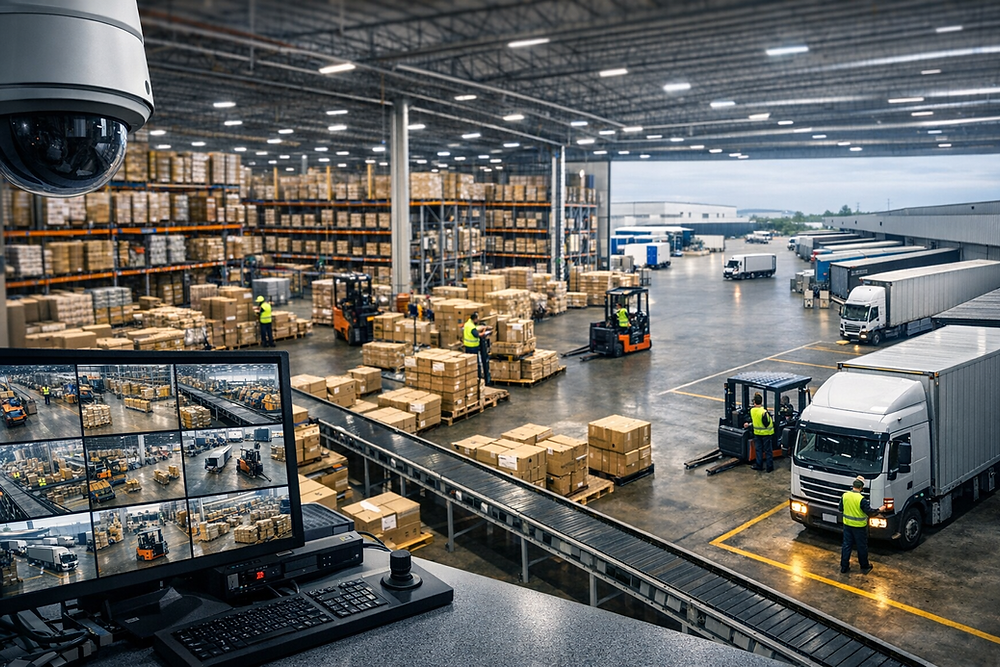
1. Why Do Factories and Warehouses Need CCTV Installation?
Industrial facilities often operate for long hours, sometimes across multiple shifts. Raw materials, finished goods, equipment and vehicles move through different sections of the property throughout the day.
Without suitable surveillance coverage, it can be difficult to review incidents, investigate missing inventory, verify dispatch activities or identify unauthorised access.
Major benefits of industrial CCTV systems
- Asset protection: Monitor machinery, tools, raw materials and finished goods.
- Inventory monitoring: Review the movement of products between storage, packing and dispatch areas.
- Gate security: Monitor employee, visitor and vehicle entry and exit.
- Loading and dispatch monitoring: Review goods loading, unloading and vehicle movements.
- Incident investigation: Review recorded footage after theft, damage, disputes or accidents.
- Operational visibility: Give authorised managers a visual overview of selected work areas.
- Remote monitoring: View cameras from authorised computers or mobile devices.
- Perimeter protection: Monitor boundary walls, gates, parking areas and outdoor storage.
2. Which Areas Should Have CCTV Cameras in a Factory?
Camera placement should be based on the factory layout, security risks, operational requirements and the type of activity that needs to be recorded.
A. Main entrance and security gate
The main entrance is one of the most important CCTV locations. It is where employees, visitors, contractors, delivery vehicles and transport trucks enter and leave the premises.
Recommended coverage includes:
- Main vehicle entrance and exit.
- Pedestrian entry and exit.
- Security guard cabin.
- Visitor registration area.
- Vehicle inspection point.
- Entry barriers and access-control points.
Consider a combination of overview cameras and dedicated vehicle-facing cameras. If number-plate capture is required, select a suitable ANPR/LPR camera and lens based on vehicle speed, distance, angle and lighting.
B. Production and manufacturing floor
Production areas contain machinery, workstations, raw materials and employees performing different operations. CCTV can provide visibility into selected production areas and support incident reviews.
Possible camera locations include:
- Production line entrances.
- Assembly and packaging stations.
- Machine operation areas.
- Raw material handling zones.
- Finished product movement areas.
- Restricted production sections.
Use suitable fixed cameras for consistent views of important work areas. Multiple cameras may be needed when machines, pillars or equipment create blind spots.
C. Raw material storage area
Raw materials may be stored in racks, containers, dedicated rooms or open yards. Cameras should monitor access points and the movement of materials.
Recommended locations include:
- Storage room entrances.
- Material issue and receiving counters.
- High-value material racks.
- Restricted storage sections.
- Outdoor material storage areas.
D. Finished goods warehouse
Finished products may be stored for several days or weeks before dispatch. CCTV coverage can help review inventory movement and access to storage sections.
Install cameras to monitor:
- Warehouse entrances.
- High-value inventory locations.
- Storage aisle intersections.
- Goods movement routes.
- Dispatch preparation areas.
- Warehouse supervisor stations.
E. Loading and unloading bays
Loading docks are busy areas where trucks, forklifts, workers and goods move simultaneously. They are important locations for monitoring delivery and dispatch activities.
Camera placement should cover:
- Loading dock doors.
- Truck parking and reversing areas.
- Goods loading and unloading points.
- Dispatch verification areas.
- Vehicle exit routes.
Use suitable image quality and positioning to capture the movement of goods and vehicles. Wide Dynamic Range (WDR) may help where bright outdoor light enters through open loading doors.

F. Factory perimeter and boundary wall
Large industrial facilities may have long boundary walls, fences, outdoor yards and multiple access points.
Consider cameras at:
- Main boundary gates.
- Vulnerable fence sections.
- Outdoor storage yards.
- Parking areas.
- Remote utility buildings.
- Vehicle movement routes.
For large outdoor areas, PTZ cameras, long-range fixed cameras or thermal cameras may be considered after a site assessment. A PTZ camera can pan, tilt and zoom, but it should not replace fixed cameras where uninterrupted views of critical areas are required.
3. Which Areas Should Have CCTV Cameras in a Warehouse?
Warehouse surveillance requires special attention because high storage racks, narrow aisles, forklifts and changing stock arrangements can create blind spots.
A. Warehouse entry and exit
Monitor employee access, delivery vehicles and goods entering or leaving the warehouse. Use camera views that capture both the overall entrance and important details where required.
B. Storage racks and aisles
Long aisles and tall racks can block the view of cameras mounted in unsuitable positions. Plan camera placement based on rack height, aisle width and forklift movement.
Depending on the layout, cameras may be installed at aisle ends, intersections or selected overhead positions. Test the view with the racks fully loaded rather than planning only from an empty warehouse layout.
C. Picking and packing areas
These areas involve order preparation, scanning, packing and product handling. Cameras can help review workflow and investigate order-related disputes.
D. Dispatch and receiving areas
Install cameras to capture incoming deliveries, outgoing shipments, loading activities and vehicle movement. Where required, use dedicated views for delivery documentation or goods handover points.
E. Inventory and high-value storage
High-value products, electronics, tools and sensitive materials may need additional coverage. Focus cameras on access points and movement routes rather than relying only on a wide-angle view of the entire room.
F. Parking and outdoor yard
Monitor staff vehicles, transport trucks, loading areas and outdoor inventory. Outdoor cameras should be selected according to weather exposure, viewing distance and lighting conditions.
4. Industrial CCTV Camera Placement Plan
Before installation, divide the factory or warehouse into surveillance zones. Identify what each camera needs to achieve: general observation, movement detection, person recognition, vehicle identification or close-up evidence.
| Zone | Primary Purpose | Possible Camera Type |
|---|---|---|
| Main gate | People and vehicle entry | Bullet, turret or ANPR/LPR camera |
| Production floor | Process visibility and incident review | Fixed IP dome, turret or bullet |
| Warehouse aisles | Stock movement and aisle coverage | Fixed IP camera with suitable lens |
| Loading dock | Goods and vehicle movement | Bullet or varifocal camera with suitable WDR |
| Perimeter | Boundary monitoring | Outdoor bullet, PTZ or thermal where appropriate |
| High-value storage | Restricted access and inventory protection | Fixed high-resolution camera |
| Parking area | Vehicle movement | Bullet or PTZ camera |
| Control room | Recorder and monitoring equipment protection | Fixed indoor camera |
For additional industrial camera-placement ideas, see IDIS – Factory and Warehouse Surveillance System Design and D-Link – IP Surveillance for Manufacturing and Loading Docks.
5. Which Types of CCTV Cameras Are Suitable for Factories and Warehouses?
Different industrial areas require different camera designs. The camera should be selected according to viewing distance, lighting, mounting position, environmental conditions and the level of detail required.
A. Bullet CCTV Cameras
Bullet cameras are commonly used for outdoor monitoring and directional views. They are suitable for selected entrances, boundary areas, parking zones and loading docks.
Common features include:
- Fixed or varifocal lens options.
- Infrared night vision on supported models.
- Outdoor weather-resistant housings.
- High-resolution video options.
B. Dome and Turret CCTV Cameras
Dome and turret cameras are often used indoors, including offices, corridors, production areas and warehouse sections.
They can provide a compact installation and a suitable field of view for indoor monitoring. Check the model's impact rating if the camera may be exposed to physical damage.
C. IP CCTV Cameras
IP cameras transmit video over an IP network and are widely used in modern industrial surveillance systems.
They can support high-resolution video, network recording, remote monitoring and integration with compatible video management systems.
D. PTZ Cameras
PTZ means Pan, Tilt and Zoom. These cameras can move horizontally, vertically and optically zoom into selected areas.
They may be useful for:
- Large factory compounds.
- Outdoor storage yards.
- Long perimeter sections.
- Large parking areas.
- Wide industrial campuses.
PTZ cameras are useful for actively observing large areas, but a PTZ camera cannot provide a permanent view of every direction at once. Use fixed cameras for critical areas that must always remain visible.
E. ANPR/LPR Cameras
Automatic Number Plate Recognition (ANPR), also known as License Plate Recognition (LPR), is designed to capture and process vehicle registration plates.
These cameras may be useful at factory gates, weighbridges, vehicle checkpoints and dispatch entrances.
Number-plate performance depends on camera angle, vehicle speed, lighting, shutter settings, plate condition and software compatibility.
F. Thermal Cameras
Thermal cameras detect infrared radiation emitted by objects and display temperature-related differences. They may be used for perimeter detection, equipment monitoring or specialised industrial applications.
Thermal cameras do not normally provide the same facial or number-plate details as conventional optical cameras. They should be selected for a specific detection or temperature-monitoring purpose.
6. Important CCTV Features for Industrial Environments
Factories and warehouses can expose cameras to challenging environmental conditions. Consider these specifications before selecting equipment.
A. IP66 or IP67 weather protection
Outdoor cameras may be exposed to rain, dust and moisture. An appropriate IP-rated enclosure can help protect the equipment when correctly installed.
- IP66: Dust-tight and protected against powerful water jets under specified test conditions.
- IP67: Dust-tight and protected against temporary immersion under specified test conditions.
Choose a rating based on the actual installation environment. An IP rating does not automatically make a camera suitable for chemical exposure, extreme heat or explosive atmospheres.
B. IK impact protection
IK ratings indicate resistance to mechanical impact. Cameras installed in accessible or high-risk locations may benefit from suitable impact protection.
C. Night vision
Night vision helps monitor outdoor areas and sections of a factory that operate after dark. Select infrared, colour night vision or suitable low-light technology according to the lighting conditions and identification requirements.
D. Wide Dynamic Range (WDR)
WDR can help manage scenes with strong differences between bright and dark areas. It is useful near loading docks, gates and entrances where outdoor sunlight or vehicle headlights may affect the image.
E. Varifocal lenses
Varifocal lenses allow the field of view to be adjusted within the lens's supported range. They are useful where the installer needs to balance wide-area coverage with detail at a specific distance.
F. Video analytics
Selected cameras and video management systems offer analytics such as:
- Motion detection.
- Line crossing detection.
- Intrusion detection.
- People and vehicle classification.
- Object detection.
- Restricted-area alerts.
Analytics performance depends on the camera, software, lighting, installation angle and scene conditions. They should be tested at the actual site before being relied upon.
7. CCTV Network Infrastructure for Factories and Warehouses
A large CCTV installation needs more than cameras and a recorder. It also requires a properly designed network infrastructure to transport video reliably.
Important network components
- Cat6 or suitable Ethernet cabling: Connects IP cameras to network switches or compatible NVRs.
- PoE switches: Supply power and network connectivity to compatible IP cameras through Ethernet.
- Managed network switches: Help manage network traffic and monitoring in larger systems.
- Fibre-optic backbone: Can connect distant buildings or network distribution points.
- Network racks and patch panels: Organise network and CCTV equipment.
- UPS: Provides backup power for selected cameras, switches, recorders and network equipment.
- Surge protection: May be required according to electrical design and site exposure.
For large sites, the network should be planned according to camera count, resolution, frame rate, bitrate, cable distances and available bandwidth.
8. DVR vs NVR: Which Recording System Is Better?
The recording device is responsible for receiving and storing camera footage.
DVR system
A Digital Video Recorder (DVR) is generally used with compatible analog HD cameras connected through coaxial video cables.
NVR system
A Network Video Recorder (NVR) records video from compatible IP cameras over a network. It is commonly used in modern IP CCTV installations.
| Feature | DVR | NVR |
|---|---|---|
| Camera type | Compatible analog HD cameras | Compatible IP cameras |
| Connection | Usually coaxial video cabling | Ethernet network |
| PoE support | Not generally part of traditional DVR architecture | Available on supported PoE NVR models |
| Expansion | Depends on recorder channels and supported formats | Depends on channels, network capacity and recorder specifications |
| Typical application | Existing analog CCTV systems | New IP surveillance installations |
For a new multi-camera industrial installation, an IP camera and NVR system is often worth considering. However, the correct solution depends on existing infrastructure, camera compatibility, budget and recording requirements.
Read our related guide: DVR vs NVR: Which Is Better? Replace the homepage URL with the actual published article URL.
9. How Much CCTV Storage Is Required for a Factory or Warehouse?
Storage planning is particularly important for industrial facilities because they may have many cameras recording continuously throughout the day and night.
The required hard disk capacity depends on:
- Total number of cameras.
- Camera resolution.
- Video bitrate.
- Frame rate.
- H.264 or H.265 compression.
- Continuous or motion-based recording.
- Required retention period.
Illustrative CCTV storage calculation
A useful first estimate is:
Storage per day in GB ≈ Bitrate in Mbps × 10.8
For multiple cameras:
Total storage in GB ≈ Bitrate × 10.8 × Camera Count × Recording Days
Example: 16 cameras recording continuously
Assume a system has 16 cameras, each recording at an average bitrate of 4 Mbps, continuously for 30 days.
- Storage per camera per day: 4 × 10.8 = 43.2 GB.
- Storage for 16 cameras per day: 43.2 × 16 = 691.2 GB.
- Estimated storage for 30 days: 691.2 × 30 = 20,736 GB.
This is approximately 20.7 TB using decimal units, before allowing for overhead, variable bitrates, recorder requirements and usable capacity differences.
Read our related article: How Much Storage Is Required for CCTV Cameras? Replace the homepage URL with the actual published article URL.
10. CCTV Control Room and Remote Monitoring
Large factories and warehouses may need a central monitoring room where authorised security staff can view multiple camera feeds.
A CCTV control room may include:
- Monitoring displays or video wall.
- NVRs and video management software.
- Network switches and structured cabling.
- Operator workstations.
- UPS and suitable ventilation.
- Camera location maps and channel labels.
- Documented incident response procedures.
Camera names should be clear and logical, such as Main Gate, Raw Material Store, Production Line 1, Warehouse Aisle 3 and Dispatch Bay 2. This helps operators find the correct view quickly.
Remote monitoring can also be configured for authorised managers through supported desktop or mobile applications. Access should be protected using strong passwords and appropriate permissions.

11. CCTV Installation Process for Factories and Warehouses
A professional CCTV installation should follow a structured process. This helps avoid blind spots, unnecessary cabling, recorder capacity problems and poor camera positioning.
Step 1: Site survey
Inspect the property and identify important security areas, entry points, production zones, storage sections, loading docks and outdoor boundaries.
Step 2: Security requirement assessment
Discuss the business's requirements, including theft prevention, vehicle monitoring, inventory movement, incident review, night surveillance and remote access.
Step 3: Camera layout planning
Prepare a camera location plan showing the intended position, viewing direction, coverage area and camera type for each location.
Step 4: Camera and equipment selection
Select cameras, lenses, recorders, switches, cables, storage devices, power supplies and mounting accessories based on the design.
Step 5: Network and cable installation
Install the required Ethernet, fibre or coaxial cabling. Use suitable routes, cable protection and installation practices for the environment.
Step 6: Camera mounting
Mount cameras at suitable heights and angles. Ensure they do not obstruct machinery, vehicle routes, emergency exits or normal production activities.
Step 7: DVR/NVR configuration
Configure camera channels, recording schedules, storage, date and time, user access and remote monitoring.
Step 8: Testing and commissioning
Test all cameras during daytime and nighttime conditions where applicable. Verify live views, playback, alerts, network connectivity and recording retention settings.
Step 9: Handover and documentation
Provide the business with equipment details, camera maps, user access instructions, warranty information and maintenance recommendations.
For a practical Indian warehouse installation example, review the Central Warehousing Corporation CCTV installation tender document. It describes a joint site survey, camera-location marking, NVR connectivity, display and maintenance requirements.
12. Special Considerations for Dusty, Hot and Hazardous Areas
Industrial environments may expose CCTV equipment to dust, heat, moisture, vibration, chemicals and other challenging conditions.
| Environment | Important Consideration |
|---|---|
| Dusty production area | Suitable sealed housing and appropriate cleaning schedule |
| Outdoor monsoon exposure | Suitable IP-rated camera and protected cable entry |
| High-temperature area | Check camera operating-temperature limits and installation distance from heat sources |
| High-vibration machinery | Secure mounting and suitable vibration-resistant installation |
| Corrosive environment | Appropriate corrosion-resistant materials and enclosures |
| Cold storage | Check operating-temperature range and condensation protection |
| Flammable gas or combustible dust area | Use equipment certified for the classified hazardous area and engage competent specialists |
13. CCTV Cybersecurity and Privacy for Industrial Facilities
Modern IP cameras and NVRs are network-connected devices. They should be protected against unauthorised access, weak passwords, outdated firmware and insecure remote connections.
Cybersecurity recommendations
- Change default camera and recorder passwords.
- Use strong and unique administrator credentials.
- Update firmware according to manufacturer guidance.
- Restrict access to authorised users.
- Use secure remote access methods.
- Separate CCTV devices from general business networks where appropriate.
- Disable unused services and accounts.
- Maintain a record of configuration changes.
- Review manufacturer security advisories.
In India, the Ministry of Electronics and Information Technology issued an advisory on CCTV and video surveillance system information leakage in March 2024. The government also announced CCTV Essential Requirements and related security measures in March 2026.
Businesses should check the current model-specific compliance and procurement requirements before purchasing CCTV equipment, particularly for public-sector or regulated projects.
Official references:
- MeitY – Advisory on Information Leakage Through CCTV and Video Surveillance Systems (11 March 2024).
- Press Information Bureau – CCTV Security Requirements Update (25 March 2026).
Privacy and employee monitoring
Businesses should establish a clear and lawful purpose for CCTV monitoring. Inform employees, visitors and contractors about surveillance through appropriate notices and internal policies.
- Avoid cameras in toilets, changing rooms and other highly private areas.
- Restrict access to recorded footage.
- Define how long recordings are retained.
- Document who can view, export or share footage.
- Use audio recording only after carefully reviewing applicable legal and privacy requirements.
- Protect footage from unauthorised copying or disclosure.
Seek appropriate legal advice when designing workplace surveillance policies and retention procedures.
14. How Much Does CCTV Installation Cost for Factories and Warehouses in India?
The cost of industrial CCTV installation depends on the number of cameras, camera specifications, site area, cable distance, recorder capacity, network infrastructure and installation complexity.
A small warehouse with a few cameras will have different requirements from a large manufacturing facility with several buildings, perimeter monitoring, fibre connectivity and a central control room.
Factors that affect installation cost
- Number of cameras and camera resolution.
- Indoor and outdoor camera types.
- PTZ, ANPR or specialist camera requirements.
- Ethernet, coaxial and fibre cabling.
- PoE switches, racks and network equipment.
- DVR/NVR channel capacity.
- Hard disk storage and retention period.
- UPS and backup power requirements.
- Mounting poles, conduits and civil work.
- Remote monitoring and software requirements.
- Installation height, access and site complexity.
Because industrial projects vary considerably, it is better to conduct a site survey and prepare a bill of materials before estimating the final cost.
15. CCTV Maintenance for Factories and Warehouses
Regular maintenance helps keep the surveillance system operational and ensures that recorded footage is available when needed.
Daily checks
- Check camera online status.
- Review recorder alerts.
- Confirm critical cameras are showing live video.
Weekly checks
- Review selected camera recordings.
- Check for missing footage or recording gaps.
- Inspect important camera views for obstructions.
Monthly checks
- Clean accessible camera lenses and covers.
- Check HDD status and available capacity.
- Inspect visible cables and connectors.
- Test night vision and remote viewing.
- Review power backup status.
Quarterly checks
- Inspect outdoor camera housings and mounting points.
- Review camera coverage and blind spots.
- Check network switches and recorder condition.
- Review firmware and user permissions.
- Document faults, repairs and upgrades.
Read our related article: CCTV Maintenance Checklist for Businesses. Replace the homepage link with the actual published article URL.
16. Why Choose Virnobyte for Factory and Warehouse CCTV Installation?
Virnobyte Private Limited provides CCTV surveillance, networking, computer hardware and IT infrastructure solutions for industrial units, factories, warehouses, offices and commercial properties.
We understand that industrial surveillance requires more than simply mounting cameras. The camera layout, cable routes, network infrastructure, recording capacity, lighting conditions and site environment all need to be considered.
Our industrial CCTV and IT services include:
- Factory and warehouse CCTV installation.
- Indoor and outdoor IP camera installation.
- Analog HD CCTV and DVR solutions.
- NVR and PoE camera systems.
- Factory entrance and perimeter surveillance.
- Loading and dispatch area monitoring.
- Night vision and low-light camera solutions.
- Network cabling, switches and connectivity.
- HDD storage planning and recorder configuration.
- Remote monitoring setup.
- CCTV troubleshooting and maintenance.
- Hardware and networking AMC services.
Our service coverage
Virnobyte has its head office in Pune, Maharashtra, provides services across Maharashtra, has a strong presence in Karnataka and Goa, and also serves customers across Pan India.
On-site installation and maintenance availability depends on project location, site requirements and service feasibility. Remote assistance and product supply can be arranged according to the project.
Planning CCTV Installation for Your Factory or Warehouse?
Protect your production areas, warehouse inventory, loading docks, vehicle entrances and outdoor premises with a surveillance system planned around your facility.
Contact Virnobyte Private Limited to discuss your industrial CCTV, networking and maintenance requirements.
VIRNOBYTE PRIVATE LIMITED
Technology • Innovation • Trust
Head Office: Sadichha Complex, Sawtamali Temple Road, Jadhavwadi, Chikhali, Pune – 411062, Maharashtra, India.
Phone: 8669883332
Email: info@virnobyte.com
Website: www.virnobyte.com
Service coverage: Maharashtra • Karnataka • Goa • Pan India
Frequently Asked Questions (FAQs)
1. How many CCTV cameras does a factory need?
The number depends on the factory's size, layout, security requirements, number of entrances, production sections, storage areas and outdoor perimeter. A site survey is the best way to determine the required camera count.
2. Which CCTV camera is best for a warehouse?
Fixed IP bullet, turret and dome cameras are commonly suitable for different warehouse areas. PTZ cameras may help monitor large outdoor yards. The right model depends on rack height, aisle layout, lighting and viewing distance.
3. Where should CCTV cameras be installed in a factory?
Important locations include the main gate, employee entrances, production floor, raw material storage, finished goods warehouse, loading bays, dispatch areas, parking and perimeter boundaries.
4. Is an IP CCTV system better for factories?
IP CCTV is often suitable for new industrial installations because it supports network-based video, PoE connectivity, centralised recording and flexible expansion. However, the best choice depends on the existing infrastructure and project requirements.
5. Should factories use PoE CCTV cameras?
PoE cameras can simplify installation by carrying power and network data through one Ethernet cable. They are useful when supported by compatible PoE switches or NVRs with sufficient power capacity.
6. What is the best CCTV camera for a factory entrance?
A suitable outdoor bullet or turret camera can provide an overview of the entrance. If vehicle number-plate capture is required, use a dedicated ANPR/LPR camera designed for the distance, angle and vehicle speed.
7. Is night vision necessary for warehouses?
Night vision is useful for warehouses that operate after dark or have outdoor areas with limited lighting. Select infrared or colour night vision according to the actual lighting and identification requirements.
8. How many days of CCTV recording should a factory store?
The required retention period depends on company policy, security risks, contractual requirements and applicable regulations. Calculate storage using the number of cameras, bitrate, recording schedule and required days.
9. Can factory CCTV cameras be viewed remotely?
Yes. Compatible IP cameras and DVR/NVR systems can support remote viewing through authorised desktop or mobile applications, subject to suitable network connectivity and secure configuration.
10. Can CCTV cameras monitor loading and dispatch activities?
Yes. Cameras can cover loading docks, goods movement, vehicle entry and exit, and dispatch areas. Positioning should provide useful views of the activity and any important handover points.
11. Are normal CCTV cameras suitable for chemical or hazardous areas?
Not necessarily. Areas containing flammable gas, vapour or combustible dust may require specially certified equipment suitable for the classified hazardous area. Consult qualified industrial specialists before installation.
12. Does Virnobyte provide factory and warehouse CCTV installation outside Pune?
Virnobyte has its head office in Pune, provides services across Maharashtra, has a strong presence in Karnataka and Goa, and serves customers across India. On-site service availability depends on location and project requirements.
Helpful External Resources and Industrial CCTV Guides
Explore these resources for further information about factory surveillance, warehouse camera placement, industrial security and CCTV system design.
- Hikvision – Electronics Manufacturing Plant Solution: Industrial surveillance applications for production areas, loading docks, warehouses and manufacturing operations.
- IDIS – Factory and Warehouse Surveillance System: Example of a network-based CCTV layout with NVRs, cameras and monitoring zones.
- D-Link – IP Surveillance for Manufacturing and Loading Docks: Explains how IP video surveillance can support loading dock monitoring and operational visibility.
- Axis Communications – Perimeter and Area Protection: Information about perimeter surveillance, PTZ cameras, detection and monitoring.
- UK National Protective Security Authority – CCTV Control Room Best Practice: Guidance on camera maps, monitoring arrangements and control-room operator requirements.
- Government of India – MeitY CCTV Information Leakage Advisory: Official advisory addressing information-security risks in CCTV and video surveillance systems.
- Press Information Bureau – CCTV Security Requirements Update, March 2026: Government information about CCTV Essential Requirements and security testing.
- Central Warehousing Corporation – CCTV Installation Tender Example: Indian warehouse tender document describing site survey, camera marking, NVR connectivity and maintenance requirements.
Disclaimer: This article provides general CCTV planning information. Actual camera count, locations, specifications, retention periods and installation methods should be determined through a site survey and risk assessment. CCTV must not interfere with machinery, emergency exits or workplace safety systems. Electrical work, working at height and installation in hazardous areas must be carried out by appropriately qualified professionals. Check current model-specific security and procurement requirements before purchasing equipment. External photographs belong to their respective owners; obtain permission or use appropriately licensed images before commercial publication.