
DVR vs NVR: Which Is Better?
Compare DVR vs NVR security systems based on video quality, camera compatibility, wiring, storage, cost and features. Discover which CCTV recorder is best for your home or business in India.
By virnobyte team · · 17 min read

DVR vs NVR: Which Is Better? Complete CCTV Recorder Comparison Guide (2026)
When installing a CCTV surveillance system, choosing the right recorder is essential. A Digital Video Recorder (DVR) and a Network Video Recorder (NVR) both store security footage, but they use different technologies to receive, process and record video.
A DVR generally works with analog or HD-over-coax cameras, whereas an NVR is designed for IP network cameras. The right choice depends on your camera type, property layout, existing wiring, storage requirements and budget.
Whether you are installing CCTV at home, upgrading an existing shop surveillance system or planning security for an office or warehouse, this guide will help you understand the differences and select the right recording system.
1. What Is a DVR (Digital Video Recorder)?
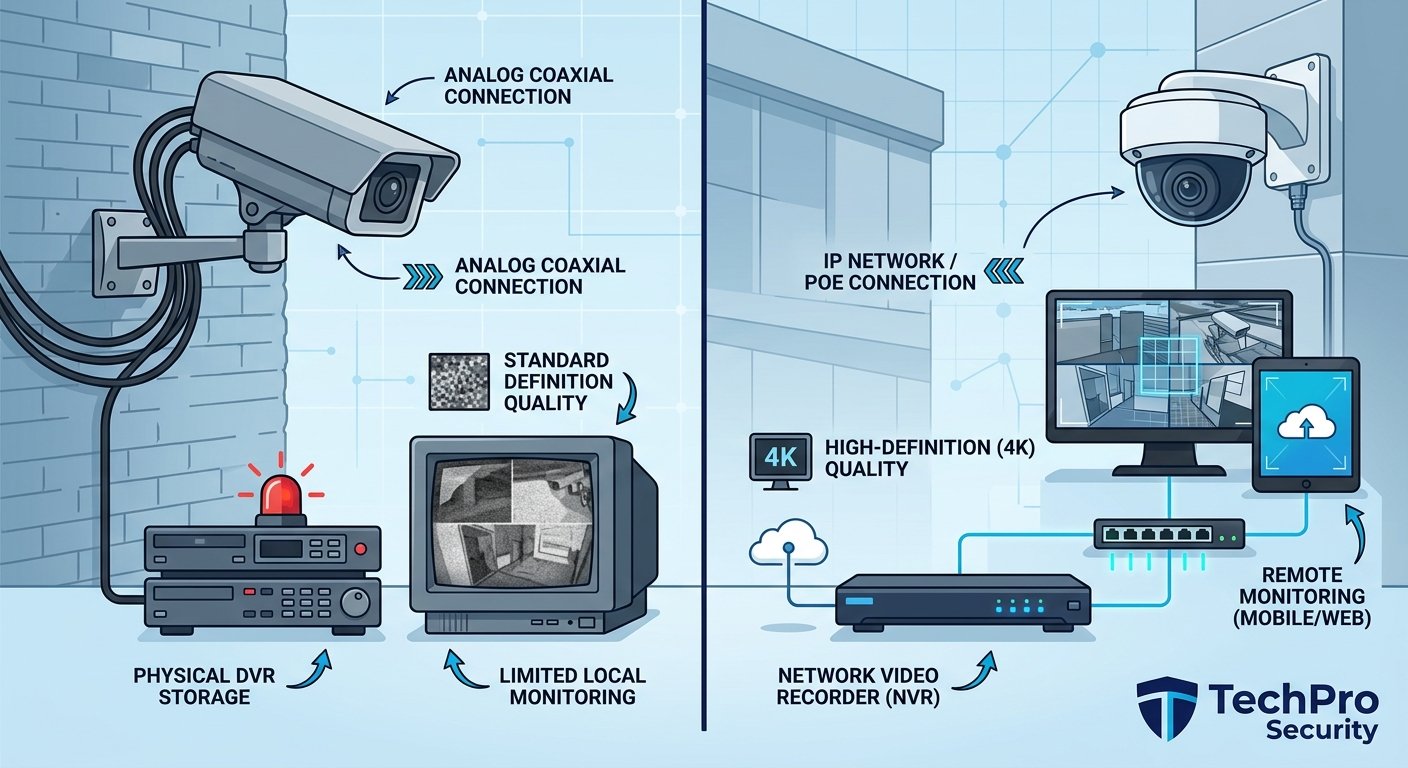
A DVR, or Digital Video Recorder, is a CCTV recording device commonly used with analog and HD-over-coax cameras. It receives video signals through coaxial cables, processes and encodes the video at the recorder, and saves the footage to an internal hard drive.
Traditional analog cameras offer lower resolutions, but modern HD-over-coax technologies such as HD-TVI, HD-CVI and AHD support high-definition video. Depending on the camera and DVR, these systems can support resolutions such as 2MP, 5MP and selected 8MP models.
How does a DVR system work?
- The CCTV camera captures video from the surrounding area.
- The camera sends its video signal through a coaxial cable.
- A separate power connection usually supplies electricity to the camera.
- The DVR receives and processes the video signal.
- The recorder stores footage on a compatible surveillance hard drive.
- A monitor displays live video and saved recordings.
- If the DVR supports network access, authorized users can view footage remotely through a compatible application.

Common applications of DVR systems
- Small retail shops
- Homes and apartments
- Small offices
- Existing analog CCTV installations
- Basic indoor and outdoor surveillance
- Properties where coaxial wiring is already available
2. What Is an NVR (Network Video Recorder)?
An NVR, or Network Video Recorder, is a recording device designed for IP-based CCTV cameras. Unlike a traditional DVR, an NVR receives digital video streams from network cameras over Ethernet or another supported network connection.
IP cameras process and encode video internally before transmitting it to the NVR. The recorder manages the incoming streams and stores footage on compatible hard drives.
Many modern NVRs include Power over Ethernet (PoE) ports. This allows compatible IP cameras to receive electrical power and transmit video through a single Ethernet cable.
How does an NVR system work?
- An IP camera captures video and processes it digitally.
- The camera encodes the video and sends it through a network connection.
- An Ethernet cable connects the camera to a PoE switch or compatible NVR port.
- The NVR receives the digital video stream.
- The recorder stores video footage on its hard drive.
- Users can view live footage and recordings through a connected monitor or supported application.
Common applications of NVR systems
- Corporate offices
- Manufacturing facilities
- Warehouses and distribution centres
- Educational institutions
- Hospitals and commercial buildings
- Large residential properties
- Businesses requiring advanced video analytics
3. DVR vs NVR: Main Differences
The main difference between a DVR and an NVR is how each device receives and processes video. A DVR processes video signals from analog cameras, while an NVR records digital video streams from IP cameras.
| Comparison | DVR | NVR |
|---|---|---|
| Full form | Digital Video Recorder | Network Video Recorder |
| Camera compatibility | Analog and compatible HD-over-coax cameras | Compatible IP network cameras |
| Video processing | At the recorder | Primarily inside the camera |
| Common cable | Coaxial cable | Cat5e or Cat6 Ethernet cable |
| Connector | Usually BNC | Usually RJ45 |
| Power supply | Usually separate camera power | PoE or separate power, depending on model |
| Video quality | Depends on the HD analog format and equipment | Depends on IP camera resolution and specifications |
| Recording storage | Internal compatible hard drive | Internal compatible hard drive; selected systems support additional storage options |
| Remote viewing | Available on network-enabled models | Available on supported network-enabled models |
| Smart features | Depends on camera and recorder | Can support advanced camera-side analytics |
| Installation | Suitable for existing coaxial installations | Requires network cabling and planning |
| Typical initial cost | Often lower for basic systems | Can be higher depending on cameras and network equipment |
4. Video Quality: DVR vs NVR
Video quality is one of the most important considerations when choosing a CCTV recorder. The recorder must support the resolution and video format of the cameras connected to it.
DVR video quality
Modern HD analog cameras use technologies such as HD-TVI, HD-CVI and AHD to transmit high-definition video over coaxial cables.
Depending on the compatible equipment, a DVR system may support Full HD, 5MP and selected 8MP cameras. However, not every DVR supports every resolution or camera format.
NVR video quality
NVR systems work with digital IP cameras and offer a wide range of resolutions, including 2MP, 4MP, 5MP, 8MP and higher-resolution options.
They are useful when a business needs detailed images, flexible camera options or selected advanced analytics. However, a higher megapixel rating alone does not guarantee better identification. Sensor quality, lens, lighting, frame rate and camera positioning also matter.
| Requirement | What to Check |
|---|---|
| Basic home surveillance | Suitable HD camera and reliable recording |
| Shop entrance monitoring | Camera resolution, lens and identification distance |
| Office monitoring | Image clarity, coverage and recording frame rate |
| Warehouse surveillance | Wide coverage, low-light performance and storage |
| Detailed identification | Pixel density at the required viewing distance |
5. Wiring and Installation Differences
DVR and NVR systems use different cabling methods. This can affect installation time, cable costs and future expansion.
DVR wiring
DVR systems commonly use coaxial cables to transmit video from cameras to the recorder. Each camera usually needs a separate power connection.
Some installations use Siamese cable, which combines a coaxial video cable and power conductors in one outer cable. Certain HD-over-coax systems also support power-over-coax, but this requires compatible equipment.
NVR wiring
NVR systems commonly use Cat5e or Cat6 Ethernet cables. When the cameras and network equipment support PoE, one Ethernet cable can carry both data and power.
This can simplify cable management, especially in offices, warehouses and commercial buildings.
| Wiring Feature | DVR System | NVR System |
|---|---|---|
| Video cable | Coaxial | Ethernet |
| Power connection | Usually separate | Can use PoE |
| Camera connector | BNC | RJ45 |
| Network planning | Generally simpler for basic installations | Important for bandwidth and network security |
| Existing wiring | May reuse compatible coaxial cables | May reuse suitable Ethernet cabling |
6. DVR vs NVR: Storage and Recording Capacity
Both DVR and NVR systems store recorded video on compatible surveillance hard drives. The amount of storage required depends on the number of cameras, resolution, frame rate, compression and recording schedule.
DVR storage requirements
A DVR receives video from compatible analog cameras and records the processed footage to its internal hard drive. Its maximum supported camera resolution, recording channels and storage capacity depend on the specific model.
NVR storage requirements
An NVR records digital video streams received from IP cameras. Some NVR models support multiple hard drives, larger storage capacities or additional storage integrations. These features are model-dependent.
Factors that affect CCTV storage
- Number of connected cameras
- Video resolution
- Frame rate
- Video compression such as H.264 or H.265
- Continuous or motion-based recording
- Required recording retention period
- Camera activity and scene complexity
For example, an eight-camera system recording continuously at high resolution will generally require more storage than a system using fewer cameras or event-based recording.
7. Remote Viewing: Can DVR and NVR Work on Mobile?
Yes. Both DVR and NVR systems can support remote viewing if the recorder and its software provide the required network features.
Remote viewing with a DVR
A network-enabled DVR can connect to a router and provide remote viewing through a compatible mobile application. Users can view live video, search recordings and export supported clips.
Remote viewing with an NVR
An NVR can provide similar remote monitoring features for connected IP cameras. Depending on the equipment, users may also receive motion alerts, event notifications and other supported smart features.
Important security precautions
- Change default passwords immediately.
- Use strong and unique login credentials.
- Restrict access to authorized users.
- Keep recorder firmware and mobile applications updated.
- Use supported secure remote-access methods or a properly configured VPN.
- Avoid exposing recorder services directly to the internet through insecure port forwarding.
8. Cost Comparison: DVR vs NVR in India
The total CCTV installation cost depends on camera quantity, recorder specifications, cable length, hard-drive capacity, accessories and labour.
For basic installations, a DVR system can often be more economical, especially when existing coaxial cables are suitable for reuse. An NVR system may require a higher initial investment because of IP cameras, PoE switches and network infrastructure.
| Cost Component | DVR | NVR |
|---|---|---|
| Recorder | Often economical for basic systems | Depends on channels, bandwidth and features |
| Cameras | Compatible analog or HD-over-coax cameras | Compatible IP cameras |
| Cabling | Coaxial and power wiring | Ethernet and network infrastructure |
| Power equipment | Camera power supply may be required | PoE switch or PoE NVR may be required |
| Installation | Can be economical with existing coaxial wiring | Depends on network layout and cabling |
| Future expansion | Depends on DVR channel and format support | Depends on NVR channels, bandwidth and network capacity |
There is no fixed price difference for every installation. Ask for a detailed quotation that includes cameras, recorder, hard drive, cabling, power equipment, installation labour, configuration and applicable taxes.
9. Advantages and Disadvantages of DVR Systems
Advantages of DVR
- Often lower initial cost for basic surveillance systems.
- Suitable for existing analog and HD-over-coax installations.
- Can reuse compatible coaxial cabling.
- Simple architecture for smaller installations.
- Modern HD analog cameras can provide good image quality.
Disadvantages of DVR
- Separate camera power connections are commonly required.
- Camera compatibility depends on the supported analog formats.
- Advanced analytics may be limited or recorder-dependent.
- Expansion depends on available recorder channels.
- Moving to a fully IP-based system may require new network cabling.
10. Advantages and Disadvantages of NVR Systems
Advantages of NVR
- Works with network-based IP cameras.
- Supports a wide range of high-resolution cameras.
- PoE can provide power and data through one Ethernet cable.
- Selected models support advanced camera analytics.
- Offers network-based camera management.
- Suitable for new installations and planned expansion.
Disadvantages of NVR
- Initial equipment cost can be higher.
- Requires network and bandwidth planning.
- PoE switches and other network equipment may add cost.
- Ethernet cable distance limitations must be considered.
- Cybersecurity maintenance is important.
- Camera and recorder interoperability must be checked.
11. What Is a Hybrid DVR or XVR?
A hybrid DVR, commonly called an XVR, is a recording device designed to support selected combinations of analog and IP cameras. It can help property owners upgrade an existing CCTV installation without replacing every camera immediately.
For example, a business may already have four analog cameras installed using coaxial cables. Instead of replacing the complete system, it may be possible to use a compatible XVR and add selected IP cameras.
Benefits of a hybrid CCTV recorder
- Can retain compatible existing analog cameras.
- Allows selected IP cameras to be added.
- Supports phased CCTV upgrades.
- May reduce the need for immediate rewiring.
- Can be useful for small businesses upgrading surveillance gradually.
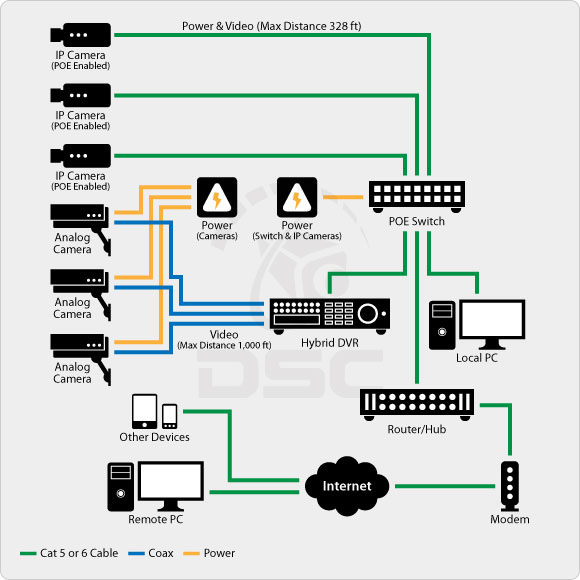
Before purchasing an XVR, check the supported analog formats, maximum IP camera channels, resolution limits and network bandwidth. Not every hybrid recorder supports every camera type or feature.
12. Which Is Better for Different Properties?
The best recorder depends on the size of the property, existing infrastructure and security requirements.
| Property Type | Suggested System | Why? |
|---|---|---|
| Small home | DVR or NVR | Choose based on budget, camera requirements and available wiring. |
| Retail shop | DVR or NVR | DVR suits basic surveillance; NVR may suit advanced monitoring. |
| Small office | Either system | Depends on camera quantity and future expansion. |
| Large corporate office | NVR | Useful for network-based management and selected analytics. |
| Warehouse | NVR or suitable DVR | Choose based on cable distances, coverage and storage needs. |
| Manufacturing facility | NVR or hybrid system | Can support network integration and phased upgrades. |
| Existing analog installation | DVR or XVR | May reuse compatible coaxial cabling. |
13. How to Choose the Right DVR or NVR
Before purchasing a CCTV recorder, consider the following points.
1. Check camera compatibility
Confirm whether your cameras are analog HD or IP cameras. The recorder must support the camera technology and video format.
2. Choose the correct channel capacity
Common recorder capacities include 4-channel, 8-channel, 16-channel and 32-channel models. Select a recorder based on the cameras you need today and the expansion you expect later.
3. Check recording resolution
Make sure the recorder supports the resolution and frame rate of the cameras. Some recorders have different limits for recording, live viewing and playback.
4. Calculate storage requirements
Choose compatible surveillance storage based on the number of cameras and the required recording retention period.
5. Check network and bandwidth requirements
For NVR systems, verify the incoming bandwidth, decoding capacity, PoE budget and network ports. Channel count alone does not tell you whether the recorder can handle all the cameras at full quality.
6. Check future expansion
If you plan to add cameras later, select a system with sufficient channels, storage and network capacity.
7. Verify manufacturer support
Check firmware availability, warranty, mobile application support, camera compatibility and after-sales service before making a purchase.
14. Common Mistakes to Avoid When Buying a CCTV Recorder
- Buying an incompatible recorder: A standard DVR will not automatically work with every IP camera, and an NVR will not directly accept ordinary analog camera signals.
- Ignoring channel capacity: A recorder with insufficient channels may require replacement when more cameras are added.
- Choosing insufficient storage: The system may retain fewer days of footage than expected.
- Ignoring bandwidth: Multiple high-resolution IP cameras can overload an inadequately planned network or recorder.
- Using unsuitable hard drives: Select storage designed and approved for the intended surveillance workload.
- Not checking remote access: Confirm that mobile viewing and playback are supported.
- Ignoring cybersecurity: Change default passwords and keep equipment updated.
- Skipping compatibility checks: Check camera formats, resolution, PoE standards and supported features before installation.
15. DVR vs NVR: Final Recommendation
Both DVR and NVR systems can provide reliable CCTV recording when correctly selected and installed. The better option depends on your existing infrastructure and the type of surveillance system you want.
Choose DVR if:
- You already have compatible analog or HD-over-coax cameras.
- Your property has suitable existing coaxial wiring.
- You want an economical basic CCTV installation.
- You do not require extensive network-based features.
Choose NVR if:
- You are installing a new IP-based CCTV system.
- You want network-based camera management.
- You need selected advanced analytics features.
- You want to use PoE-compatible cameras.
- You expect the surveillance system to expand.
16. Why Choose Virnobyte for CCTV Installation?
Virnobyte Private Limited provides CCTV surveillance, networking and IT infrastructure solutions for homes, offices and businesses. We help customers evaluate their security requirements and select suitable equipment based on camera quantity, recording needs, property layout and budget.
Our CCTV and IT services include:
- DVR and NVR installation
- Analog HD CCTV camera installation
- IP camera installation and configuration
- Hybrid CCTV system upgrades
- PoE switch and network configuration
- Remote viewing setup
- Structured cabling and networking
- CCTV maintenance and IT support
Virnobyte has its head office in Pune, Maharashtra, a strong presence in Karnataka and Goa, and serves customers across India. On-site service availability depends on location and project requirements.
Need Help Choosing the Right CCTV Recorder?
Whether you need a DVR for an existing analog system or an NVR for a new IP camera installation, Virnobyte can help you evaluate suitable options.
VIRNOBYTE PRIVATE LIMITED
Technology • Innovation • Trust
Head Office: Sadichha Complex, Sawtamali Temple Road, Jadhavwadi, Chikhali, Pune – 411062, Maharashtra, India.
Phone: 8669883332
Email: info@virnobyte.com
Website: www.virnobyte.com
Service coverage: Pune, Maharashtra | Karnataka | Goa | Pan India
Contact Virnobyte to discuss your CCTV requirements and request a site assessment.
Frequently Asked Questions (FAQs)
1. What is the main difference between DVR and NVR?
A DVR records video from analog or HD-over-coax cameras, usually through coaxial cables. An NVR records digital video streams from IP cameras connected through a network.
2. Is NVR better than DVR?
An NVR is generally better suited to new IP camera installations and network-based surveillance. A DVR is a practical option for existing analog systems and budget-conscious installations.
3. Can I connect IP cameras to a DVR?
Some DVRs and hybrid XVR recorders support selected IP cameras. Check the recorder's supported IP channels, resolution and compatibility before purchasing.
4. Can I connect analog cameras to an NVR?
A standard NVR is designed for IP camera streams and does not directly accept ordinary analog video signals. A suitable encoder or hybrid system may be required.
5. Does an NVR require internet to record?
No. An NVR can generally record IP camera streams over a local network without an internet connection, provided the cameras, recorder and storage are powered and connected correctly. Internet is generally needed for remote access from outside the local network.
6. Which recorder is cheaper, DVR or NVR?
A basic DVR system is often less expensive initially. However, the total installation cost depends on cameras, cabling, power equipment, recorder specifications, storage and labour.
7. Can DVR and NVR both support mobile viewing?
Yes. Both can support mobile viewing if the recorder includes compatible network and remote-access features and is configured correctly.
8. How many cameras can a DVR or NVR support?
Common models support 4, 8, 16 or 32 channels, while larger systems are also available. Always check the supported channel count and recording capacity of the specific model.
9. What is an XVR in CCTV?
An XVR is a hybrid recorder that supports selected combinations of analog HD and IP cameras. It can help upgrade an existing analog installation gradually.
10. Which CCTV recorder is suitable for a warehouse?
An NVR may be suitable for a warehouse that needs network-based cameras, high-resolution video and advanced features. A DVR or hybrid recorder can also work where existing coaxial wiring and camera requirements make it practical.
Helpful External Guides and Technical Resources
For more information about CCTV recording technology, cabling and recorder selection, explore these resources:
- CCTV Camera World – DVR vs NVR: What Is the Difference? Explains recorder architecture, camera compatibility, wiring and installation considerations.
- Fora Soft – NVR vs DVR Explained Covers video processing, storage and the difference between network and analog recording.
- Cisco – IP Camera Installation Guide Provides information about IP camera network connections and installation.
- CCTV NVR vs DVR in India – Recorder Selection Guide Discusses channel capacity, cabling, PoE and hybrid recorders.
- Hikvision – Official Support and FAQs Consult product-specific documentation and compatibility information.
Disclaimer: This article is for general educational purposes. Recorder specifications, supported camera formats, resolution, storage limits, network features and prices vary by manufacturer and model. Confirm compatibility before purchasing. External images are illustrative references; obtain reuse permission or replace them with licensed or original photographs before publishing commercially.