
Structured Cabling for Offices
Learn about office structured cabling, including Cat6 cables, patch panels, network racks and cable management to build a reliable, organised and scalable business network.
By virnobyte team · · 19 min read

Structured Cabling for Offices: Complete Guide to Cat6, Patch Panels, Network Racks and Installation
A reliable office network starts with well-planned network cabling. Computers, printers, servers, IP phones, CCTV cameras and Wi-Fi access points all depend on a properly designed network infrastructure to communicate efficiently.
Structured cabling for offices is an organised system of cables, connectors, patch panels, network racks and pathways that connects different devices throughout a workplace. Instead of installing separate cables whenever a new device is added, structured cabling creates a standardised and manageable infrastructure.
Whether you are setting up a small office, expanding a corporate workspace or building a new commercial facility, professional cabling can make network expansion, maintenance and troubleshooting easier.
This guide explains Cat5e, Cat6 and Cat6A cables, patch panels, network racks, cable management, installation procedures, testing methods and common mistakes to avoid.

1. What Is Structured Cabling?
Structured cabling is a standardised infrastructure used to connect computers, network equipment and other communication devices within a building or campus.
It includes horizontal cabling, backbone cabling, patch panels, network outlets, patch cords, equipment racks and cable pathways. These components work together to create an organised network that can support data, voice, video, wireless access points and IP-based devices.
For example, in a typical office, a Cat6 cable may run from a network rack to a wall outlet near an employee's desk. A short patch cable then connects the wall outlet to the computer. At the network rack, the permanent cable terminates at a patch panel, which is connected to a network switch using another patch cable.
This design makes it easier to identify, test, repair and reorganise network connections.
Structured cabling vs unorganised cabling
| Structured Cabling | Unorganised Cabling |
|---|---|
| Centralised cable management | Separate cables installed as needed |
| Labelled network connections | Difficult-to-identify cables |
| Patch panels and network racks | Direct connections without a consistent layout |
| Easier troubleshooting | More time spent tracing cables |
| Designed for future expansion | May require extensive rework |
| Documented and testable links | Limited installation documentation |
2. Main Components of an Office Structured Cabling System
A structured cabling system consists of several components. Each plays an important role in maintaining an organised and reliable network.
1. Ethernet cables
Ethernet cables carry data between network devices. Cat5e, Cat6 and Cat6A are commonly used copper twisted-pair cabling categories for office installations.
2. Patch panels
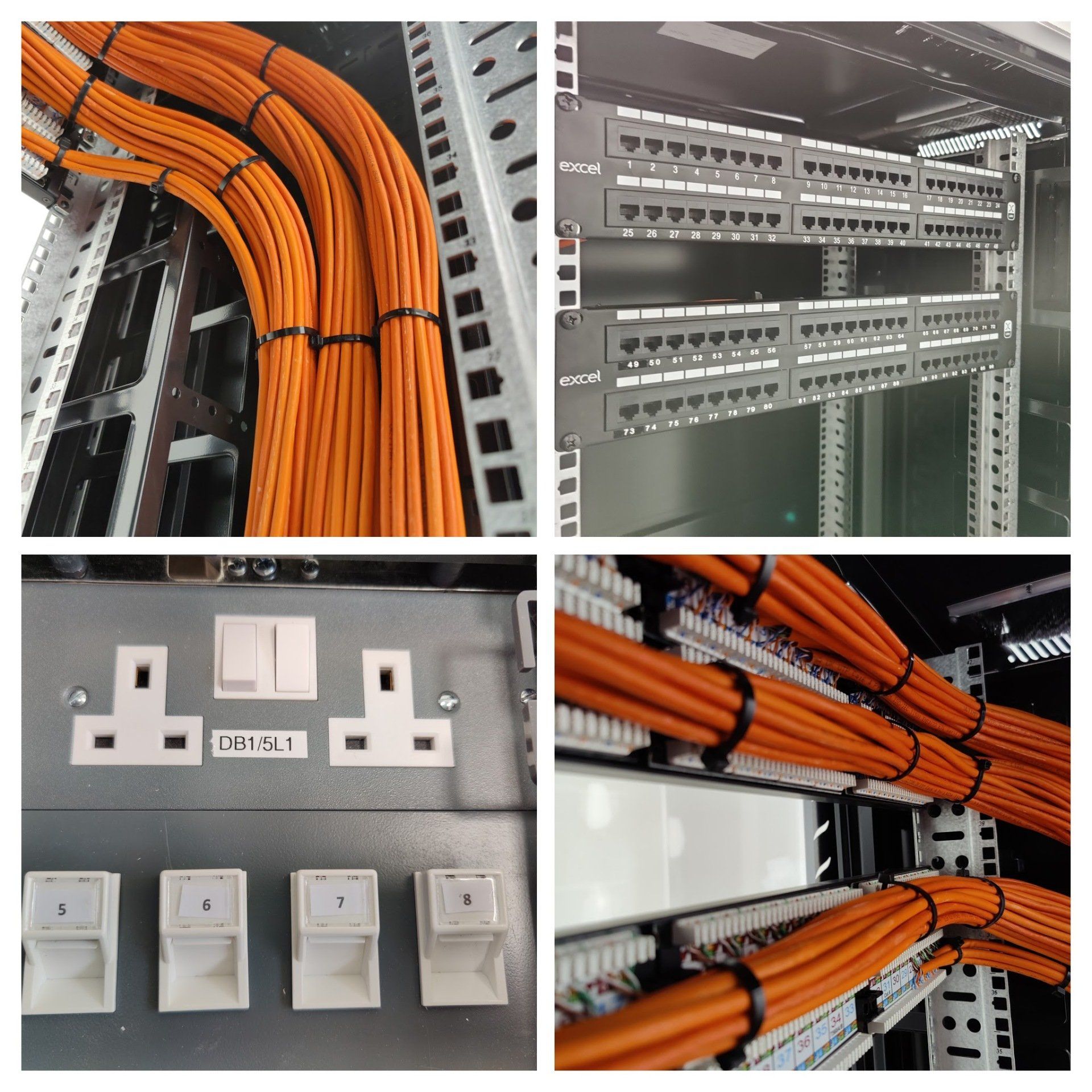
A patch panel is a rack-mounted panel with multiple network ports. Permanent horizontal cables from office outlets terminate at the rear of the patch panel. Short patch cords connect the front ports to network switches.
3. Network racks
A network rack or cabinet houses switches, patch panels, routers, firewalls, cable management accessories and other networking equipment.
4. Keystone jacks and faceplates
Keystone jacks are modular connectors installed in wall plates, floor boxes or other outlets. They provide a convenient Ethernet connection point at employee desks, meeting rooms and other work areas.
5. Patch cords
Patch cords are short, flexible cables used to connect computers to outlets and patch panels to network switches. Factory-made patch cords that match the cabling category are recommended for reliable connections.
6. Cable trays and conduits
Cable trays, conduits, trunking and raceways provide pathways for network cables. They help organise cable routes and protect cables from physical damage.
7. Fibre optic cables
Fibre optic cables are often used for backbone connections between floors, buildings, network rooms or distant equipment areas. They can support high bandwidth over distances beyond the practical reach of standard copper Ethernet horizontal cabling.
| Component | Purpose |
|---|---|
| Cat6 / Cat6A cable | Connects network outlets to the central distribution point |
| Patch panel | Terminates and organises permanent network cables |
| Network rack | Houses switches, patch panels and related equipment |
| Keystone jack | Provides an outlet for connecting user devices |
| Patch cord | Connects equipment to patch panels and wall outlets |
| Cable tray / conduit | Provides a protected and organised cable route |
| Fibre optic cable | Connects network rooms, floors and buildings |

3. Cat5e vs Cat6 vs Cat6A: Which Cable Is Best for Offices?
Choosing the correct cable category is one of the most important decisions when planning office structured cabling.
The right choice depends on required network speed, distance, connected devices, future expansion and project budget.
| Cable Category | Bandwidth | Typical Ethernet Capability | Office Suitability |
|---|---|---|---|
| Cat5e | 100 MHz | 1 Gbps up to 100 metres | Existing networks and basic connectivity |
| Cat6 | 250 MHz | 1 Gbps up to 100 metres; 10 Gbps over shorter distances, depending on conditions | Good option for many office networks |
| Cat6A | 500 MHz | 10 Gbps up to 100 metres | Higher-performance and future-oriented installations |
Cat5e cable
Cat5e is a widely used Ethernet cabling category for Gigabit networking. It can be suitable for basic office connectivity where high-speed upgrades are not a priority.
Cat6 cable
Cat6 provides improved transmission performance compared with Cat5e and is commonly used for modern office LAN installations. It supports Gigabit Ethernet across a standard 100-metre channel. It can also support 10 Gigabit Ethernet over shorter distances, depending on the installation and interference conditions.
Cat6A cable
Cat6A is designed for 10 Gigabit Ethernet over a full 100-metre channel. It is a suitable option for offices that need higher bandwidth, advanced wireless access points, demanding applications or a longer-term cabling investment.
Which cable should your office choose?
- Small office: Cat6 is often a practical choice for typical Gigabit connectivity.
- Growing business: Compare Cat6 and Cat6A based on expected network upgrades.
- Large corporate office: Cat6A may be appropriate for higher-performance user and access point links.
- Backbone connections: Consider fibre optic cabling between network rooms, floors or buildings.
Read more:
4. What Is a Patch Panel and Why Is It Important?
A patch panel is one of the most important components in an organised office cabling system. It acts as a central termination point for horizontal network cables that run to workstations, meeting rooms, printers and other devices.
Instead of connecting every permanent office cable directly to a network switch, the cables terminate at labelled patch panel ports. Short patch cords then connect selected ports to switch ports.
Benefits of patch panels
- Organises multiple Ethernet connections in one location.
- Makes it easier to identify individual cable runs.
- Allows network connections to be changed without disturbing permanent cabling.
- Improves rack organisation and cable management.
- Supports testing and documentation of individual links.
- Helps simplify future office expansion.
Common patch panel types
| Patch Panel Type | Use |
|---|---|
| 24-port patch panel | Small and medium network installations |
| 48-port patch panel | Larger office and business networks |
| Cat6 patch panel | Cat6 structured cabling systems |
| Cat6A patch panel | Cat6A cabling systems |
| Fibre patch panel | Fibre optic termination and distribution |

5. Network Rack Setup for Offices
A network rack provides a central location to organise networking equipment. It is particularly useful in offices where multiple switches, patch panels, routers and other IT devices need to be managed.
A properly planned rack helps protect equipment, improve accessibility and simplify maintenance.
Common equipment installed in a network rack
- Network switches
- Patch panels
- Router and firewall
- Fibre optic termination panels
- Horizontal and vertical cable managers
- UPS (Uninterruptible Power Supply)
- Rack-mounted power distribution unit (PDU)
- Other suitable network equipment
How to organise a network rack
- Choose a rack with sufficient height, depth and load capacity.
- Install patch panels and cable management accessories in suitable positions.
- Mount switches and other network equipment with appropriate airflow clearance.
- Route and secure cables through the correct management pathways.
- Label patch panel ports and equipment connections.
- Plan electrical power distribution and UPS backup appropriately.
- Maintain suitable ventilation and physical access controls.
6. Cable Management: Why Is It Important?
Cable management is the process of routing, securing, organising and identifying network cables within an office building and network rack.
Poorly managed cables can make maintenance difficult and increase the risk of accidental disconnections, physical damage and confusion during network upgrades.
Best practices for office cable management
- Use cable trays, trunking and suitable conduits for planned routes.
- Use horizontal and vertical cable managers inside network racks.
- Label cables at both ends.
- Use suitable hook-and-loop straps without compressing cable bundles.
- Maintain the cable manufacturer's recommended bend radius.
- Avoid excessive pulling force during installation.
- Keep pathways accessible for future maintenance.
- Separate data cables from electrical wiring according to applicable codes and standards.
- Protect cables from sharp edges, moisture, heat and mechanical damage.
- Remove abandoned cables when permitted and properly documented.
7. How to Plan Structured Cabling for an Office
Before purchasing cables and network equipment, prepare a cabling plan based on the office layout and expected network requirements.
Step 1: Conduct a site survey
Inspect the office floor plan and identify desk locations, meeting rooms, network equipment areas, printers, CCTV cameras, Wi-Fi access points and other network devices.
Step 2: Estimate the number of network points
Determine how many Ethernet outlets are needed for each workstation and shared area. Consider current requirements and likely future expansion.
For example, a workstation may need separate connections for a desktop computer, IP phone or other wired equipment. Meeting rooms may require additional network connections for conferencing and presentation systems.
Step 3: Decide the cable category
Choose Cat6 or Cat6A based on performance requirements, installation cost, device capabilities and future bandwidth needs.
Step 4: Select the network rack location
Choose a secure, ventilated and accessible location for the main network rack. For larger offices, separate floor-level telecommunications rooms may be required.
Step 5: Plan cable pathways
Identify suitable cable tray, ceiling, floor and conduit routes. Coordinate with electrical, HVAC, fire safety and building contractors before installation.
Step 6: Plan switch and patch panel capacity
Estimate the required number of switch ports and patch panel ports. Keep expansion capacity where practical.
Step 7: Prepare the documentation
Prepare a network point schedule, rack layout, cable identification plan and floor-wise cable route documentation before installation begins.
8. Structured Cabling Network Diagram for an Office
The following diagram illustrates a typical office structured cabling arrangement. Permanent horizontal cables run from the network rack to wall outlets and equipment locations.
In an actual installation, each office outlet connects back to a patch panel using its own permanent horizontal cable. Patch cords then connect the relevant patch panel ports to network switches.
9. Step-by-Step Structured Cabling Installation Process
A professional cabling installation should follow a planned sequence rather than routing cables randomly through the office.
Step 1: Site inspection and layout planning
Inspect the building, identify network outlet locations and determine the required cable routes, racks and pathways.
Step 2: Material selection
Select compatible Cat6 or Cat6A cables, patch panels, keystone jacks, faceplates, patch cords, racks and other accessories.
Step 3: Install cable pathways
Install the required cable trays, conduits, trunking or other approved pathways. Ensure that routes provide suitable physical protection and access for maintenance.
Step 4: Pull the network cables
Pull each cable from the network rack or telecommunications room to the intended outlet. Respect bend radius and pulling tension limits.
Step 5: Terminate the cable ends
Terminate the permanent cables on the patch panel and matching keystone jacks or outlets. Use a consistent approved wiring scheme, such as T568A or T568B, at both ends of each link.
Step 6: Install and organise the rack
Mount the patch panels, switches and cable management accessories. Arrange cables neatly and avoid unnecessary strain on connectors.
Step 7: Label both ends
Assign a unique identification code to every cable and its corresponding network outlet.
Step 8: Test every network link
Test the installed connections with suitable testing equipment. Use a cable certifier when project acceptance requires category performance certification.
Step 9: Prepare handover documents
Provide the final network point schedule, patch panel mapping, test reports, rack layout and cable route information to the client.
10. Structured Cabling Standards and Testing
Structured cabling should be designed and installed using applicable telecommunications standards, manufacturer specifications and local building and safety requirements.
Important TIA standards
| Standard | General subject |
|---|---|
| ANSI/TIA-568 series | Structured telecommunications cabling performance and components |
| ANSI/TIA-569 | Telecommunications pathways and spaces |
| ANSI/TIA-606 | Telecommunications infrastructure identification and documentation |
| ANSI/TIA-607 | Telecommunications bonding and grounding |
| ISO/IEC 11801 | Generic cabling for customer premises |
Learn more from the Telecommunications Industry Association (TIA) Standards overview and its TIA-568 standard information.
For an Indian technical reference, see the Department of Telecommunications' Structured LAN Cabling document. This is an older technical reference, so check the latest applicable project requirements rather than treating it as a substitute for current standards.
Why cable testing is important
A network cable should not be considered properly installed just because a link light appears on the switch. A cable may show a connection while still having wiring faults or failing required performance limits.
Testing helps identify:
- Incorrect wire mapping.
- Open or short circuits.
- Split pairs and termination problems.
- Excessive cable length.
- Signal performance issues.
- Faulty connectors and patch cords.
For certification of copper cabling, a suitable cable certifier can test parameters such as wire map, insertion loss, return loss, NEXT and other category-specific performance requirements.
Basic continuity testers are useful for identifying certain wiring faults, but they do not replace category certification testing.
For additional installation guidance, read the Belden Copper Structured Cabling Design Guide.
11. Common Structured Cabling Mistakes to Avoid
Incorrect installation practices can cause network problems, difficult maintenance and expensive rework. Avoid these common mistakes:
- Using low-quality cables: Select cables from reputable manufacturers and verify the specified category and construction.
- Using copper-clad aluminium cables: Specify solid bare copper horizontal cabling appropriate to the intended application rather than substituting lower-quality conductors.
- Skipping patch panels: Use an organised termination arrangement for permanent structured cabling.
- Not labelling cables: Unlabelled connections make troubleshooting more difficult.
- Incorrect termination: Follow the selected wiring scheme consistently at both ends.
- Excessive cable bending: Respect the cable manufacturer's minimum bend radius.
- Over-tight cable ties: Avoid excessive compression of cable bundles.
- Mixing data and electrical pathways improperly: Follow applicable separation requirements and building codes.
- Ignoring future expansion: Consider spare ports and suitable pathway capacity during planning.
- Not testing the installation: Test and document every installed link before handover.
12. Structured Cabling for Different Office Environments
Different workplaces have different connectivity requirements. A cabling design should reflect the building layout, type of work and connected equipment.
Small offices
Small offices may need Cat6 outlets for employee computers, printers, routers, wireless access points and meeting room equipment. A suitable wall-mounted or floor-standing rack can provide a central connection point.
Corporate offices
Corporate workspaces may require multiple telecommunications rooms, several patch panels, managed switches, Wi-Fi access points and fibre backbone connections between floors.
Factories and manufacturing units
Industrial installations may require additional cable protection, suitable industrial-rated components, fibre links and careful routing around machinery and electrical equipment. Select cabling and connectors according to the environmental conditions.
Warehouses
Warehouses may require structured network connections for access points, CCTV cameras, scanners, printers and inventory systems. Cable routes should be protected from vehicles, movement and physical damage.
Meeting and conference rooms
Meeting spaces may require network outlets for video conferencing, presentation equipment, IP phones, wireless access points and other AV systems.
13. How Much Does Office Structured Cabling Cost?
The cost of structured cabling depends on the building layout, number of network points, cable category, installation route and equipment requirements.
There is no single price that applies to every office. A site survey and detailed point schedule are needed for a reliable quotation.
Factors that affect installation cost
- Number of network points and cable runs.
- Cat5e, Cat6 or Cat6A cable selection.
- Brand and quality of cables and connectivity components.
- Patch panels, racks and cable management accessories.
- Cable trays, conduits and containment work.
- Ceiling, floor and wall access requirements.
- Fibre optic backbone requirements.
- Testing, certification and documentation.
- Existing infrastructure and site conditions.
For a business installation, compare quotations based on the complete scope of work, not only the price per metre of cable.
14. Maintenance Tips for Structured Cabling Systems
After installation, periodic checks help keep the physical network infrastructure organised and easier to maintain.
- Inspect racks and patch panels periodically.
- Check that cable labels remain readable.
- Look for damaged connectors and patch cords.
- Keep network racks clean and adequately ventilated.
- Avoid unnecessary changes to permanent cable runs.
- Update cable and port documentation when connections change.
- Check rack power, UPS and equipment conditions.
- Investigate recurring network link faults.
- Maintain test reports and installation records.
15. Frequently Asked Questions (FAQs)
Q1. What is structured cabling in an office?
Structured cabling is an organised network infrastructure made up of cables, patch panels, network outlets, racks and pathways. It connects computers, printers, servers, access points and other network devices throughout an office.
Q2. Which cable is best for office networking?
Cat6 is a practical option for many Gigabit office networks. Cat6A is suitable when 10 Gigabit Ethernet over a full 100-metre channel or greater performance capacity is required.
Q3. What is the purpose of a patch panel?
A patch panel provides a central termination point for permanent network cables. It helps organise connections between office outlets and network switches.
Q4. What is the maximum distance for Cat6 Ethernet cabling?
A standard copper Ethernet channel is generally designed for up to 100 metres, including the horizontal cable and patch cords. The permanent horizontal link is generally limited to 90 metres, with the remainder allocated to patch cords. Always check the applicable cabling category and installation standard.
Q5. Is Cat6A better than Cat6?
Cat6A supports 10 Gigabit Ethernet over a 100-metre channel. Cat6 supports Gigabit Ethernet over 100 metres and may support 10 Gigabit Ethernet over shorter distances. Cat6A is generally thicker and may need more pathway space.
Q6. How many network points does an office need?
The number depends on the number of employees, workstations, printers, meeting rooms, access points, CCTV cameras and other network devices. A site survey and floor plan help determine the correct quantity.
Q7. Why should network cables be labelled?
Labels help technicians identify the corresponding patch panel port and office outlet. This makes maintenance, troubleshooting and network expansion easier.
Q8. What is the difference between horizontal and backbone cabling?
Horizontal cabling connects telecommunications rooms or distribution points to individual work areas. Backbone cabling connects equipment rooms, telecommunications rooms and other distribution areas, often using fibre optic cables where appropriate.
Q9. Is cable testing necessary after installation?
Yes. Testing helps detect wiring faults and confirms whether links meet the required performance criteria. Projects requiring category compliance should use an appropriate cable certification tester.
Q10. Can structured cabling support CCTV and Wi-Fi access points?
Yes. Structured cabling can support IP CCTV cameras, wireless access points, VoIP phones and other Ethernet-connected equipment, provided that the cable, network equipment and power requirements are correctly selected.
Conclusion: Build a Reliable Office Network with Structured Cabling
Structured cabling is an important part of modern office IT infrastructure. A properly designed system connects computers, printers, servers, CCTV cameras, wireless access points and other network devices through an organised and documented cabling layout.
Choosing the correct Cat6 or Cat6A cables, installing suitable patch panels, organising network racks, managing cable pathways and testing every connection can help create a reliable and maintainable network foundation.
Whether you are setting up a new office or upgrading an existing network, plan the cabling system according to your present requirements and future expansion needs.
Need Professional Structured Cabling for Your Office?
Virnobyte Private Limited provides computer networking and IT infrastructure solutions for offices, businesses, shops, factories and other organisations.
Our networking services include:
- Structured cabling for offices and commercial buildings.
- Cat6 and Cat6A network cabling installation.
- Patch panel installation and network rack setup.
- LAN networking and Ethernet connectivity.
- Fibre optic backbone connectivity.
- Network switch, router and firewall configuration.
- Wi-Fi access point installation.
- CCTV network cabling and PoE infrastructure.
- Network troubleshooting and IT AMC support.
Head Office:
Sadichha Complex, Sawtamali Temple Road, Jadhavwadi, Chikhali, Pune – 411062, Maharashtra, India.
Service Coverage:
Virnobyte has its head office in Pune, Maharashtra, provides services across Maharashtra, has a strong presence in Karnataka and Goa, and serves customers across Pan India. On-site service availability depends on location and project requirements; remote support and other arrangements can be discussed.
Call: 8669883332
Email: info@virnobyte.com
Website: www.virnobyte.com
Virnobyte Private Limited – Technology • Innovation • Trust